By Md. Bazlur Rahman Likhon — Senior Cloud & AI Engineer
Modern CCTV systems are no longer limited to recording video and waiting for a human operator to review it.
Today, we can build surveillance platforms where an operator can ask:
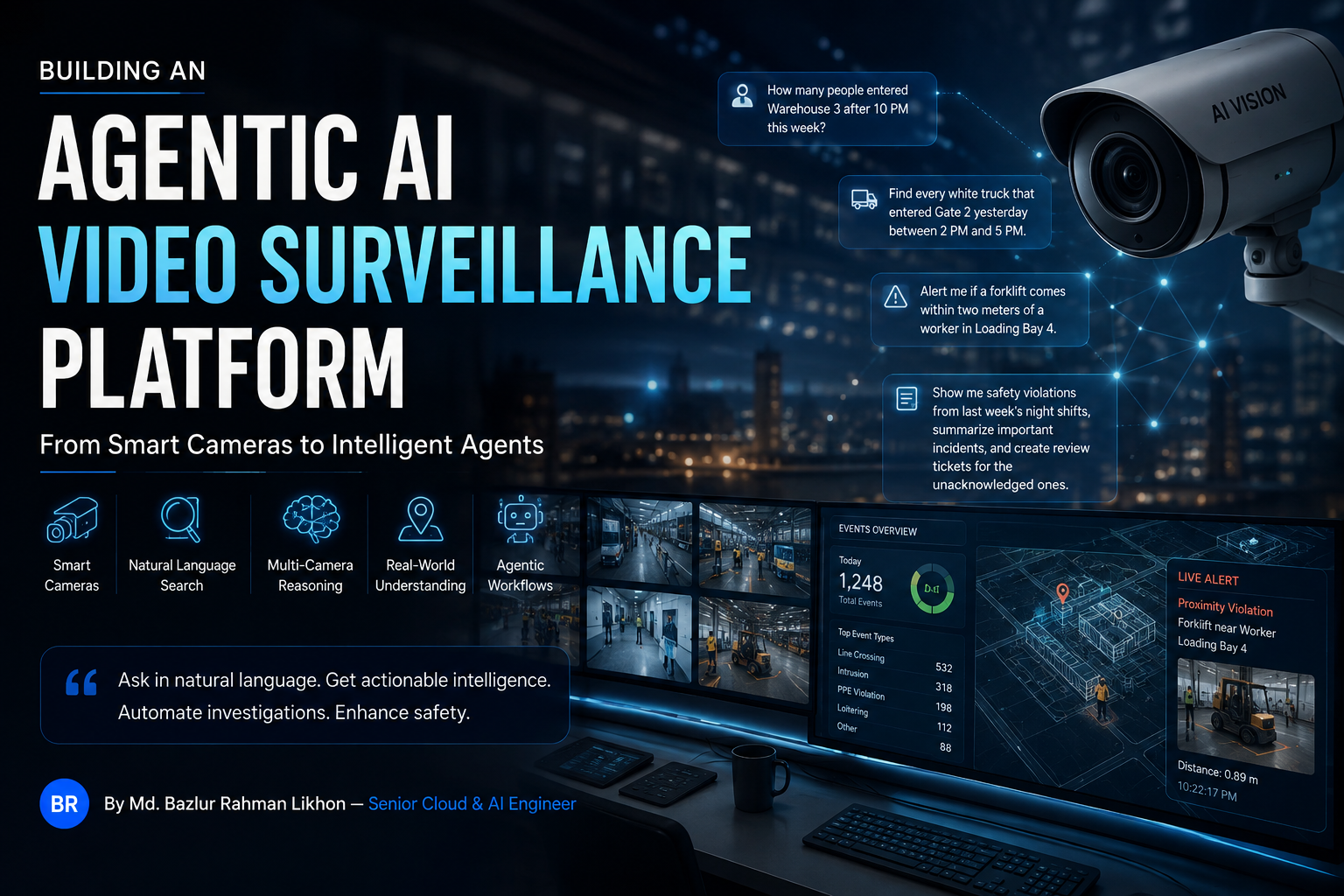
"How many people entered Warehouse 3 after 10 PM this week?"
Or:
"Find every white truck that entered Gate 2 yesterday between 2 PM and 5 PM."
Or:
"Alert me if a forklift comes within two meters of a worker in Loading Bay 4."
Or even:
"Show me safety violations from last week's night shifts, summarize the important incidents, and create review tickets for the unacknowledged ones."
A production system can understand the request, search structured surveillance events, retrieve matching video, correlate multiple cameras, reason over business context, and execute controlled workflows.
That is what I mean by an agentic AI video surveillance platform.
But there is an architectural mistake I would avoid:
Do not automatically send every CCTV stream through your own GPU computer-vision stack and rebuild intelligence that the existing cameras or NVR already generate.
Modern AI cameras and network video recorders can already provide capabilities such as:
- Human and vehicle classification
- Intrusion detection
- Line-crossing detection
- People counting
- Face and license-plate analytics on supported systems
- Object and vehicle metadata
- VCA events
- Smart forensic search
- Natural-language video retrieval on newer products
- Text-defined alarms on some newer multimodal platforms
At the same time, existing NVR intelligence will not solve every problem.
If you need:
- Specialized PPE detection
- Factory-specific behavior detection
- Cross-camera identity
- Physical-world geometry
- Custom safety relationships
- Open-vocabulary object recognition
- Semantic anomaly understanding
- Domain-specific workflows
you may need your own ML/VLM stack.
The architecture I recommend is therefore hybrid:
reuse existing edge intelligence wherever possible, add custom computer vision where necessary, normalize everything into one event model, and place the agentic reasoning layer above it.
This guide explains how to build that system end to end.
What We Are Going to Build
Our target platform has several layers.
Video intelligence
The system can detect or consume:
- People
- Vehicles
- Objects
- Intrusion
- Line crossing
- Loitering
- Direction
- Zone entry/exit
- PPE violations
- Proximity violations
- Production anomalies
- Domain-specific events
Searchable metadata
Instead of treating CCTV only as video files, we create structured intelligence such as:
{
  "timestamp": "2026-08-16T22:18:17+06:00",
  "camera_id": "warehouse-gate-03",
  "event_type": "line_crossing",
  "object_type": "person",
  "direction": "enter",
  "confidence": 0.95
}
Natural-language investigation
Operators can ask:
- "How many people entered today?"
- "Which camera had the most intrusion alarms?"
- "Find someone carrying a red bag."
- "Which factory area had the most PPE violations?"
- "Show all after-hours vehicle activity."
- "Summarize yesterday's critical incidents."
Multi-camera reasoning
The system can potentially understand:
Camera 01
    ↓
Person enters site
    ↓
Camera 04
    ↓
Same person enters corridor
    ↓
Camera 11
    ↓
Same person approaches restricted area
Physical-world reasoning
Instead of only knowing pixel coordinates:
x = 428
y = 291
we can reason about:
Worker position: (8.3 m, 12.4 m)
Forklift position: (9.1 m, 12.8 m)
Distance: 0.89 m
Agentic workflows
The system can:
- Search events
- Retrieve clips
- Query access-control data
- Check employee schedules
- Create incidents
- Generate reports
- Notify operators
- Request human approval
- Escalate according to security policy
The complete architecture looks roughly like this:
flowchart TB
    CAM[IP Cameras] --> EDGE[Camera / NVR / Edge Vision]

    EDGE --> EVENTS[Events & Metadata]
    EDGE --> VIDEO[Recorded Video]

    EVENTS --> ADAPTER[Integration Adapters]
    ADAPTER --> NORMAL[Canonical Event Model]
    NORMAL --> BUS[Event Bus]

    BUS --> DB[(Event Database)]
    BUS --> VECTOR[(Semantic Index)]
    BUS --> INCIDENT[Incident Engine]

    VIDEO --> CUSTOM[Optional Custom CV / VLM]
    CUSTOM --> NORMAL

    DB --> AGENT[Vision / Security Agent]
    VECTOR --> AGENT
    INCIDENT --> AGENT

    AGENT --> SEARCH[Search Tools]
    AGENT --> MEDIA[Media Retrieval]
    AGENT --> CONTEXT[Enterprise Systems]

    SEARCH --> AGENT
    MEDIA --> AGENT
    CONTEXT --> AGENT

    AGENT --> POLICY[Policy & Approval Layer]

    POLICY --> ALERT[Notifications]
    POLICY --> REPORT[Reports]
    POLICY --> WORKFLOW[Business Workflows]
The Three Ways to Build It
There are three realistic architectures.
| Architecture | Vision Processing | Best Use Case |
|---|---|---|
| NVR API-first | Existing camera/NVR | Modern CCTV already deployed |
| Full ML | Your GPU/edge stack | Custom analytics or legacy cameras |
| Hybrid | Both | Most enterprise environments |
The third option is usually the architecture I prefer.
First Understand the Three CCTV Data Planes
Before writing code, separate CCTV information into three categories.
Plane 1 — Raw Video
This is the traditional recording:
Camera 07
2026-08-16 10:32:00
H.265 stream
3840x2160
Raw video is valuable, but it is:
- High bandwidth
- Expensive to repeatedly decode
- Expensive to analyze
- Difficult to query directly
Plane 2 — Structured Events and Metadata
The analytics system may already produce information such as:
{
  "camera": "gate-04",
  "time": "2026-08-16T10:31:22+06:00",
  "event": "line_crossing",
  "target": "person",
  "direction": "in"
}
Or:
{
  "camera": "parking-02",
  "event": "vehicle_detected",
  "attributes": {
    "type": "truck",
    "color": "white"
  }
}
This information is far easier to analyze.
Plane 3 — Semantic Video Intelligence
Newer multimodal systems introduce another layer.
Instead of querying:
object_type = person
shirt_color = yellow
we can ask:
"Person in yellow clothing talking on a phone beside a vehicle."
The system attempts to match language with visual content.
That is a different class of retrieval.
Architecture 1: Treat the AI NVR as an Edge Inference Engine
If the organization already owns modern AI-capable surveillance equipment, investigate what intelligence it already generates.
Do not assume the NVR is only:
camera
  ↓
hard disk
A modern system may be closer to:
Camera
   ↓
AI inference
   ↓
Detection
   ↓
Classification
   ↓
Tracking
   ↓
Events / metadata
   ↓
Video recording
Your application can potentially consume the result of inference rather than performing inference again.
Modern NVRs Already Provide Significant AI
For example, Hikvision's current product ecosystem separates conventional AI analytics from newer multimodal search capabilities.
Hikvision AcuSense
AcuSense focuses heavily on analytics such as human/vehicle classification and improving alarm relevance.
Official documentation:
Hikvision AcuSeek
AcuSeek moves further toward multimodal retrieval.
Current Hikvision documentation describes AcuSeek NVRs that support natural-language-based video/image retrieval.
Some current AcuSeek products also advertise text and voice search.
Official documentation:
Hikvision VPro Series with AcuSeek
The engineering implication is important:
Natural-language CCTV search is increasingly becoming an NVR-native capability rather than something every application needs to invent from scratch.
Dahua Has a Similar Evolution
Dahua's WizSense/WizMind families provide traditional and deep-learning analytics, while newer Xinghan-powered capabilities introduce multimodal interaction.
Current Dahua documentation describes WizSeek as allowing users to describe a subject with keywords and retrieve corresponding footage.
Dahua also documents Text-Defined Alarms, where users can describe custom detection requirements in natural language.
Dahua Xinghan Multimodal Models
This is significant because it demonstrates that the industry is moving from:
draw polygon
→ select rule
→ configure threshold
toward:
describe desired situation
→ interpret intent
→ create detection behavior
But Do Not Confuse Natural-Language Search With a Full Agent
An NVR may understand:
"Find a man with a yellow shirt near a car."
That is primarily:
language
  ↓
semantic retrieval
  ↓
matching footage
A broader agent might answer:
"Which warehouse had the largest increase in after-hours security events this month, and were those incidents associated with unauthorized access-control attempts?"
That requires:
question
   ↓
understand intent
   ↓
query surveillance events
   ↓
query access control
   ↓
aggregate history
   ↓
compare sites
   ↓
reason over evidence
   ↓
answer
That is a different layer.
ONVIF Profile M Is Strategically Important
If you are building a vendor-independent platform, one of the first standards to investigate is ONVIF Profile M.
ONVIF Profile M is specifically designed around analytics metadata and events.
It supports concepts such as:
- Analytics metadata
- Metadata streaming
- Object classification
- Vehicle metadata
- License-plate metadata
- Human face metadata
- Human body metadata
- Geolocation metadata
- Counting events
- Analytics rules
- Event interfaces
Official documentation:
This gives us an architecture like:
flowchart LR
    H[Hikvision] --> O[ONVIF / Adapter]
    D[Dahua] --> O
    A[Axis] --> O
    X[Other Devices] --> O

    O --> N[Canonical Event Model]

    N --> DB[(Event Database)]
    N --> BUS[Event Bus]
    N --> AI[Agent]
The application should consume standardized intelligence where available and only fall back to proprietary APIs where necessary.
Vendor APIs Still Matter
ONVIF will not always expose every manufacturer-specific capability.
You may therefore need:
ONVIF Profile M
       +
Hikvision ISAPI
       +
Dahua CGI / SDK
       +
Axis VAPIX
       +
other vendor APIs
Hikvision provides ISAPI development resources:
The exact API availability varies by:
- Device
- Firmware
- Region
- License
- Camera/NVR combination
- Partner program
That leads to an important production rule.
Never assume a capability visible inside the NVR GUI is automatically exposed through a documented external API.
Validate it.
NVR API-First Package Stack
A practical Python integration service may use:
| Package | Purpose |
|---|---|
fastapi |
Service API |
uvicorn |
ASGI server |
httpx |
Async HTTP |
zeep |
SOAP/WSDL integrations |
lxml |
XML parsing |
pydantic |
Validation |
sqlalchemy |
Database abstraction |
psycopg |
PostgreSQL |
nats-py |
Event messaging |
redis |
Cache/state |
tenacity |
Retry logic |
python-dotenv |
Development configuration |
Install:
python -m venv .venv
source .venv/bin/activate

pip install \
  fastapi \
  "uvicorn[standard]" \
  httpx \
  zeep \
  lxml \
  pydantic \
  sqlalchemy \
  "psycopg[binary]" \
  nats-py \
  redis \
  tenacity \
  python-dotenv
For production, pin and test versions rather than deploying unbounded package upgrades.
Build an Adapter Layer
Do not expose manufacturer-specific schemas to your entire system.
Create:
Hikvision Adapter
Dahua Adapter
ONVIF Adapter
Axis Adapter
Generic RTSP Adapter
Architecture:
flowchart TB
    H[Hikvision] --> HA[Hikvision Adapter]
    D[Dahua] --> DA[Dahua Adapter]
    O[ONVIF] --> OA[ONVIF Adapter]

    HA --> N[Event Normalizer]
    DA --> N
    OA --> N

    N --> C[Canonical Event]
Define a Canonical Event Schema
The rest of the platform should not care whether an event came from Hikvision, Dahua, NVIDIA, or your own model.
from datetime import datetime
from typing import Any

from pydantic import BaseModel, Field


class BoundingBox(BaseModel):
    x: float
    y: float
    width: float
    height: float


class WorldPosition(BaseModel):
    x: float
    y: float
    z: float | None = None


class Subject(BaseModel):
    type: str
    confidence: float | None = None
    track_id: str | None = None
    global_track_id: str | None = None

    attributes: dict[str, Any] = Field(default_factory=dict)

    bbox: BoundingBox | None = None
    world_position: WorldPosition | None = None


class MediaReference(BaseModel):
    snapshot_url: str | None = None
    clip_url: str | None = None
    recording_id: str | None = None


class SurveillanceEvent(BaseModel):
    event_id: str

    site_id: str
    device_id: str
    camera_id: str

    timestamp: datetime

    event_type: str

    zone: str | None = None
    direction: str | None = None

    subject: Subject | None = None
    media: MediaReference | None = None

    source_vendor: str
    source_event_type: str | None = None

    raw_metadata: dict[str, Any] = Field(default_factory=dict)
That schema becomes your internal contract.
Keep the Original Vendor Payload
Do not discard source metadata immediately.
Your normalized event may contain:
{
  "object_type": "vehicle"
}
while the original vendor payload may have:
{
  "vehicle_type": "truck",
  "color": "white",
  "direction": "north",
  "plate_confidence": 0.87
}
Store raw_metadata according to your retention policy.
You may need those fields later.
Define an Adapter Interface
from abc import ABC, abstractmethod
from collections.abc import AsyncIterator


class VideoDeviceAdapter(ABC):

    @abstractmethod
    async def connect(self) -> None:
        ...

    @abstractmethod
    async def capabilities(self) -> dict:
        ...

    @abstractmethod
    async def events(self) -> AsyncIterator[dict]:
        ...

    @abstractmethod
    async def get_snapshot(self, camera_id: str) -> bytes:
        ...

    @abstractmethod
    async def search_video(
        self,
        camera_ids: list[str],
        query: str,
        start_time: str,
        end_time: str,
    ) -> list[dict]:
        ...
Not every implementation needs every method.
The system should discover supported capabilities.
Capability Discovery Matters
Recorder A may support:
{
  "events": true,
  "metadata": true,
  "semantic_search": false,
  "anpr": true,
  "native_people_counting": true
}
Recorder B:
{
  "events": true,
  "metadata": true,
  "semantic_search": true,
  "text_defined_alarm": true,
  "anpr": true
}
Your agent and routing layer should select capabilities based on the real device.
Prefer Event Subscriptions Over Constant Polling
Avoid this architecture where possible:
every second
    ↓
poll every NVR
    ↓
ask for new events
Prefer:
sequenceDiagram
    participant NVR
    participant Adapter
    participant Bus
    participant DB
    participant Worker

    NVR->>Adapter: Event
    Adapter->>Adapter: Normalize
    Adapter->>Bus: Publish canonical event
    Bus->>DB: Persist
    Bus->>Worker: Evaluate workflows
NATS JetStream Works Well for Event Distribution
A persisted event bus is useful because surveillance applications contain many independent consumers.
For example:
event-store
alert-engine
incident-engine
semantic-indexer
reporting-service
agent-service
metrics-service
NATS JetStream provides persistent streams, replay, and at-least-once delivery semantics.
Subjects may look like:
surveillance.factory01.gate03.person
surveillance.factory01.gate03.vehicle
surveillance.factory01.perimeter.intrusion
surveillance.factory01.safety.ppe
PostgreSQL Is Enough for a Strong First Version
Start with PostgreSQL.
CREATE TABLE surveillance_events (
    event_id UUID PRIMARY KEY,

    site_id TEXT NOT NULL,
    device_id TEXT NOT NULL,
    camera_id TEXT NOT NULL,

    event_time TIMESTAMPTZ NOT NULL,

    event_type TEXT NOT NULL,
    object_type TEXT,
    zone TEXT,
    direction TEXT,

    confidence REAL,

    attributes JSONB NOT NULL DEFAULT '{}',
    media JSONB NOT NULL DEFAULT '{}',
    raw_metadata JSONB NOT NULL DEFAULT '{}'
);
Indexes:
CREATE INDEX surveillance_events_time_idx
ON surveillance_events (event_time DESC);

CREATE INDEX surveillance_events_camera_time_idx
ON surveillance_events (camera_id, event_time DESC);

CREATE INDEX surveillance_events_type_time_idx
ON surveillance_events (event_type, event_time DESC);

CREATE INDEX surveillance_events_attributes_idx
ON surveillance_events
USING GIN (attributes);
Now:
"How many people entered Gate 3 yesterday?"
is a database query.
It is no longer a video-processing problem.
Architecture 2: Build the Complete ML Pipeline Yourself
The NVR API-first architecture is excellent when the existing infrastructure already generates the information you need.
But suppose you need:
"Detect workers touching Machine Zone B while the machine is running and the worker is not wearing the required glove."
A generic NVR may not understand that.
Now custom computer vision becomes justified.
flowchart LR
    RTSP[RTSP Cameras] --> DEC[Decode]
    DEC --> SAMPLE[Frame Sampling]
    SAMPLE --> DET[Detection]
    DET --> TRACK[Tracking]
    TRACK --> RULES[Spatial / Temporal Rules]
    TRACK --> EMB[Embeddings]

    RULES --> EVENT[Event Generator]
    EMB --> VECTOR[(Vector Index)]

    EVENT --> BUS[Event Bus]
    BUS --> DB[(Event Database)]
Full ML Package Stack
A Python prototype might include:
| Package / Technology | Purpose |
|---|---|
opencv-python-headless |
Vision processing |
av |
FFmpeg/PyAV decoding |
numpy |
Numerical processing |
Pillow |
Image handling |
torch |
Training/inference |
torchvision |
Vision utilities |
ultralytics |
Optional detector/tracker |
transformers |
VLM/open-vocabulary models |
open_clip_torch |
Image/text embeddings |
onnxruntime-gpu |
Optimized inference |
| NVIDIA TensorRT | NVIDIA inference optimization |
| NVIDIA DeepStream | Production video analytics |
| PostgreSQL | Events |
pgvector |
Vector search |
| NATS JetStream | Event distribution |
| FastAPI | APIs |
Prototype:
pip install \
  opencv-python-headless \
  av \
  numpy \
  pillow \
  ultralytics \
  transformers \
  open_clip_torch \
  pgvector \
  fastapi \
  "uvicorn[standard]" \
  pydantic \
  sqlalchemy \
  "psycopg[binary]" \
  nats-py \
  redis \
  httpx \
  tenacity
Install PyTorch, CUDA libraries, DeepStream, TensorRT, and other GPU-specific components according to the selected hardware and official compatibility matrices.
Review Computer-Vision Licensing Before Production
This is not only a technical decision.
For example, current Ultralytics licensing provides an AGPL-3.0 path and an Enterprise licensing path for proprietary/commercial deployments.
Review the current terms before designing a closed-source product around the package:
Do the same for every:
- Model
- Training dataset
- Runtime
- SDK
- NVR SDK
- VLM
- Pretrained checkpoint
Licensing is part of architecture.
RTSP Ingestion
A prototype can start with OpenCV:
import cv2


RTSP_URL = "rtsp://user:password@camera-address/stream"

capture = cv2.VideoCapture(RTSP_URL)

while True:
    ok, frame = capture.read()

    if not ok:
        break

    # Inference here
FFmpeg and GStreamer provide much richer streaming infrastructure.
References:
A Production RTSP Platform Must Handle Failure
Production systems need:
- Reconnection
- Packet loss
- Jitter
- TCP/UDP transport
- Camera restarts
- H.264
- H.265
- GPU decode
- Backpressure
- Frame dropping
- Stream health
- Latency
- Time synchronization
That is why I would not build a 500-camera deployment as 500 simplistic Python VideoCapture loops.
NVIDIA DeepStream for High-Density Video Analytics
For NVIDIA environments, DeepStream is one of the strongest production building blocks.
NVIDIA describes DeepStream as a streaming analytics toolkit that can ingest sources including RTSP and run computer vision to generate insights from video.
Its reference application supports:
- RTSP inputs
- Multiple streams
- Detection
- Tracking
- Metadata
- Message brokers
Architecture:
flowchart LR
    C1[RTSP 1] --> MUX[nvstreammux]
    C2[RTSP 2] --> MUX
    C3[RTSP 3] --> MUX
    CN[RTSP N] --> MUX

    MUX --> INF[nvinfer]
    INF --> TRACK[nvtracker]
    TRACK --> ANALYTICS[Analytics]
    ANALYTICS --> META[Metadata]
    META --> BUS[Message Layer]
This is significantly more production-oriented than decoding every camera in independent Python processes.
Add Object Tracking
Detection gives you:
Frame 100:
Person
bbox = [100, 300, 250, 700]
Next frame:
Frame 101:
Person
bbox = [105, 302, 255, 702]
Tracking answers:
Is that the same person?
Now:
{
  "frame": 101,
  "track_id": 38,
  "class": "person",
  "confidence": 0.95
}
NVIDIA's nvtracker provides persistent IDs over time and supports tracking-related metadata including trajectories and re-identification features.
Depending on your stack, alternatives include:
- ByteTrack
- BoT-SORT
- SORT-family trackers
- Re-ID-enabled trackers
Detection Must Become Events
The business user does not care that:
bbox moved from X=420 to X=480
They care that:
person entered warehouse
For example:
if previous_x < LINE_X and current_x >= LINE_X:
    emit_event(
        event_type="line_crossing",
        direction="enter"
    )
Now vision has become operational intelligence.
Define Spatial Zones
A restricted zone can be represented as a polygon.
RESTRICTED_ZONE = [
    (140, 220),
    (800, 220),
    (900, 700),
    (100, 700),
]
Then evaluate the tracked object's ground point or centroid.
But do not generate an event on every frame.
Maintain state:
outside
   ↓
enters
   ↓
generate event
   ↓
inside
   ↓
no duplicate
   ↓
exits
   ↓
reset
Add Temporal Reasoning
Real behavior exists across time.
For example:
"Person remained inside loading zone for more than 90 seconds."
requires:
entry timestamp
+
current timestamp
+
continuous track state
Architecture:
flowchart LR
    DET[Detector] --> TRACK[Tracker]
    TRACK --> STATE[Track State]
    STATE --> RULE[Rule Engine]
    RULE --> EVENT[Event]
Keep the detector and rule engine separate.
Custom PPE and Factory Models
Domain-specific computer vision is where your own ML pipeline becomes valuable.
Examples:
- Hard hat
- Safety vest
- Gloves
- Goggles
- Specialized uniform
- Machine component
- Product defect
- Unsafe action
- Production-line anomaly
Lifecycle:
flowchart TD
    DATA[Collect Data] --> LABEL[Annotate]
    LABEL --> TRAIN[Train / Fine-Tune]
    TRAIN --> VALIDATE[Validate]
    VALIDATE --> EXPORT[Export]
    EXPORT --> OPT[Optimize]
    OPT --> DEPLOY[Deploy]
    DEPLOY --> MONITOR[Monitor Failures]
    MONITOR --> DATA
Your production dataset should represent:
- Real cameras
- Real lighting
- Night conditions
- Occlusion
- Compression
- Distance
- Worker clothing
- Seasonal changes
- Camera angles
Production CV is often as much a data-engineering problem as a model problem.
Closed-Set Detection Is Not Enough for Natural-Language Rules
Suppose the operator says:
"Alert me when someone carries an unusual large package through the staff entrance."
Your detector may only understand:
person
car
truck
forklift
bag
There may be no class called:
unusual large package
This is where open-vocabulary detection becomes useful.
Add Open-Vocabulary Perception
Models such as Grounding DINO combine visual detection with text input.
The Transformers documentation describes Grounding DINO as extending closed-set object detection with a text encoder so that objects can be specified through names or referring expressions.
Conceptually:
"person carrying a yellow container"
              ↓
        text-conditioned detector
              ↓
        grounded bounding boxes
That gives us a bridge between operator language and visual perception.
Add Vision-Language Models for Semantic Understanding
Some concepts are not clean object classes.
Examples:
"Worker appears to be handling the machine incorrectly."
"Person is behaving unusually."
"Material appears to have fallen from the conveyor."
These are semantic judgments.
Architecture:
candidate event
      ↓
selected video clip
      ↓
VLM
      ↓
structured semantic assessment
      ↓
rule / agent
A critical design decision is:
Do not run a large VLM continuously over every frame unless the use case truly requires it.
Use cheaper perception first.
Use a Cascaded Perception Architecture
A production architecture can use stages:
flowchart LR
    VIDEO[Video] --> DET[Fast Detector]
    DET --> TRACK[Tracker]
    TRACK --> RULE[Cheap Rules]

    RULE -->|Normal| DROP[No Further Processing]
    RULE -->|Candidate| VLM[VLM Verification]

    VLM --> EVENT[High-Level Event]
This controls GPU cost.
Add Semantic Video Search
Structured metadata is excellent for:
object = truck
color = white
zone = gate_03
But not every query is structured.
For example:
"Find someone carrying something resembling a large red bag."
One possible architecture uses multimodal embeddings.
Models in the SigLIP/CLIP family create comparable image and text representations.
Do Not Embed Every Frame
That can create enormous storage and inference costs.
Prefer:
tracking
   ↓
select meaningful keyframes
   ↓
crop subject / scene
   ↓
embedding
   ↓
store timestamp + camera + event
Then:
text query
   ↓
text embedding
   ↓
vector search
   ↓
candidate keyframes
   ↓
video clips
PostgreSQL + pgvector
For the first implementation, you may not need a separate vector database.
pgvector provides vector similarity search inside PostgreSQL and supports approximate indexes including HNSW and IVFFlat.
Example:
CREATE EXTENSION IF NOT EXISTS vector;

CREATE TABLE surveillance_embeddings (
    id UUID PRIMARY KEY,
    event_id UUID,
    camera_id TEXT NOT NULL,
    event_time TIMESTAMPTZ NOT NULL,
    snapshot_url TEXT,
    embedding vector(768)
);
The dimension must match your model.
Do not blindly use 768.
Now Add Physical-World Geometry
This is one of the most important additions if you want the system to reason about the physical environment, rather than only image pixels.
A normal detector sees:
bounding box:
x1, y1, x2, y2
A geometry-aware platform needs:
camera calibration
       ↓
projection relationship
       ↓
world coordinates
       ↓
trajectory
       ↓
distance
       ↓
velocity
       ↓
physical relationships
Camera Calibration
OpenCV's calib3d module provides camera calibration and 3D reconstruction functionality.
OpenCV Camera Calibration and 3D Reconstruction
Conceptually we want to map:
pixel coordinate
      ↓
camera geometry
      ↓
world coordinate
For a floor plane, homography-based approaches may be sufficient.
For more complex environments, use full camera calibration and 3D methods.
Multi-Camera Tracking
A normal tracker gives you:
Camera 1:
track_id = 42
But the same person entering Camera 2 might become:
Camera 2:
track_id = 7
Cross-camera reasoning requires:
local track IDs
      ↓
appearance / Re-ID
      +
time
      +
geometry
      ↓
global object identity
Now:
Camera 1 track 42
        =
Camera 2 track 7
        =
global person 0198
NVIDIA Multi-View 3D Tracking
NVIDIA's current DeepStream documentation includes Multi-View 3D Tracking.
It uses camera calibration so measurements can be mapped into a common world coordinate system for cross-camera fusion.
This makes things such as:
- 3D position
- Velocity
- Cross-camera object fusion
- Physical trajectories
possible.
The architecture becomes:
flowchart TB
    C1[Camera 1] --> P1[Detection / Tracking]
    C2[Camera 2] --> P2[Detection / Tracking]
    C3[Camera 3] --> P3[Detection / Tracking]

    P1 --> CAL[Calibrated World Coordinates]
    P2 --> CAL
    P3 --> CAL

    CAL --> FUSION[Multi-Camera Fusion]
    FUSION --> GLOBAL[Global Tracks]

    GLOBAL --> RULES[Physical-World Rules]
Natural-Language Spatial Rules
Now we can support instructions such as:
"Alert when a forklift gets within two meters of a person inside Loading Bay 4."
The language model should not be responsible for calculating the distance itself.
Compile the instruction into a deterministic rule.
event: worker_forklift_proximity

subjects:
  - person
  - forklift

location:
  zone: loading_bay_4

condition:
  distance_less_than_meters: 2.0

duration_ms: 500

actions:
  - create_alert
  - retain_clip
Then geometry code evaluates it.
Build a Natural-Language Rule Compiler
Architecture:
flowchart LR
    A[Operator Instruction] --> B[LLM]
    B --> C[Structured Rule]
    C --> D[Schema Validation]
    D --> E[Policy Validation]
    E --> F[Rule Engine]
The LLM converts language into configuration.
It should not bypass the rule engine.
Example Rule Compiler Schema
from pydantic import BaseModel


class ProximityCondition(BaseModel):
    subject_a: str
    subject_b: str
    distance_meters: float
    zone: str | None = None
    minimum_duration_ms: int = 0


class AlertRule(BaseModel):
    name: str
    condition: ProximityCondition
    severity: str
    actions: list[str]
Language:
"Notify security if a forklift stays within one meter of a worker for more than two seconds."
Output:
{
  "name": "worker_forklift_proximity",
  "condition": {
    "subject_a": "forklift",
    "subject_b": "person",
    "distance_meters": 1.0,
    "zone": null,
    "minimum_duration_ms": 2000
  },
  "severity": "high",
  "actions": [
    "create_alert",
    "capture_clip"
  ]
}
The generated configuration must be validated before activation.
Deterministic Rules vs Semantic Rules
Not every natural-language rule belongs in the same system.
Deterministic
Examples:
- Person enters zone
- Vehicle crosses tripwire
- Person remains 60 seconds
- Forklift is within 2 meters
- More than 20 people inside area
These can be calculated reliably from structured perception.
Semantic
Examples:
- Worker behaves unsafely
- Person appears to be fighting
- Someone abandons a suspicious item
- Worker appears confused
- Machine operation looks abnormal
These may require:
- VLM
- Specialized behavior model
- Domain classifier
- Human verification
The architecture should support both.
Add Voice Commands
Voice is not inherently a surveillance capability.
It is another interface.
flowchart LR
    VOICE[Operator Voice] --> ASR[Speech Recognition]
    ASR --> TEXT[Normalized Text]
    TEXT --> AGENT[Agent]
    AGENT --> TOOLS[Surveillance Tools]

    AGENT --> ANSWER[Answer]
    ANSWER --> TTS[Optional Text-to-Speech]
Multilingual ASR Options
OpenAI's open-source Whisper supports multilingual speech recognition, speech translation, and language identification.
Meta's Omnilingual ASR project currently targets more than 1,600 languages.
This demonstrates that very broad language coverage is technically possible.
But production support should be benchmarked language by language.
Do not promise:
"supports 1,600 languages perfectly"
because a model lists 1,600 languages.
Measure:
- Word/character error rate
- Accent robustness
- Noise
- Factory background sound
- Domain vocabulary
- Local names
- Code switching
- Bangla/English mixed speech
Optional Translation Layer
If your agent uses one canonical language internally, translation can sit between ASR and the agent.
For example:
Bangla speech
    ↓
Bangla transcript
    ↓
canonical language
    ↓
agent
    ↓
translated response
Meta's NLLB-200 is one example of a machine-translation model covering 200 languages.
Modern multilingual LLMs may remove the need for a dedicated translation step in some architectures.
NVIDIA VSS: A Reference Architecture for the Vision-Agent Layer
This is an important addition to the architecture.
NVIDIA's Video Search and Summarization (VSS) Blueprint is specifically positioned as a suite of reference architectures for building vision agents and AI-powered video analytics applications.
This is a higher-level layer than DeepStream alone.
DeepStream solves much of:
video ingestion
+
decoding
+
CV inference
+
tracking
+
metadata
VSS goes further toward:
video understanding
+
VLMs
+
semantic retrieval
+
Q&A
+
summarization
+
reports
+
agent workflows
NVIDIA VSS Agent
NVIDIA's current VSS Agent documentation describes an AI-powered video analytics agent capable of:
- Answering questions about video
- Video search
- Generating incident reports
That validates the architectural concept we are building:
flowchart TB
    VIDEO[Video / CCTV] --> PERCEPTION[Vision Perception]
    PERCEPTION --> META[Events / Metadata]
    PERCEPTION --> VLM[VLM Understanding]

    META --> SEARCH[Search Layer]
    VLM --> SEARCH

    SEARCH --> AGENT[Vision Agent]

    AGENT --> QA[Q&A]
    AGENT --> SUMMARY[Summaries]
    AGENT --> REPORT[Incident Reports]
    AGENT --> ALERT[Alert Workflows]
NVIDIA VSS Search Workflow
Current NVIDIA VSS documentation includes a search workflow for natural-language queries across video archives to locate:
- Events
- Objects
- Actions
Where the documentation marks a workflow as alpha or early-stage, treat it accordingly during production architecture reviews.
The important point is not that you must deploy NVIDIA's exact stack.
It is that there is now an independently documented reference architecture demonstrating the same overall design.
NVIDIA Warehouse Blueprint
NVIDIA's current VSS Warehouse Blueprint is particularly relevant to physical-world analytics.
The 2D profile supports live video processing with object detection, tracking, and event generation.
Its documented event types include concepts such as:
- ROI events
- Tripwire events
- Proximity events
NVIDIA VSS Warehouse 2D Profile
There is also a profile combining 2D Vision AI with Agents.
NVIDIA VSS Warehouse 2D Vision AI with Agents
And the 3D blueprint supports multi-camera detection, tracking, and behavior analytics for safety scenarios.
NVIDIA VSS Warehouse 3D Profile
This provides a useful production reference for:
CCTV
 ↓
perception
 ↓
tracking
 ↓
behavior analytics
 ↓
safety events
 ↓
agent
 ↓
reports / investigation
DeepStream + TensorRT + VSS Solve Different Layers
Do not treat them as interchangeable.
DeepStream
Use for:
- Multi-stream video ingestion
- GPU decoding
- Computer vision
- Tracking
- Metadata
- Streaming pipelines
TensorRT
Use for:
- Optimizing trained models for NVIDIA GPU inference
- Reducing model execution latency
- Improving throughput
- Mixed-precision deployment where appropriate
Conceptually:
PyTorch / ONNX
      ↓
TensorRT optimization
      ↓
production inference engine
VSS
Use as a reference for:
- Video understanding
- Vision agents
- Semantic search
- Q&A
- Summarization
- Reports
- Alert workflows
Together:
flowchart LR
    CCTV[CCTV] --> DS[DeepStream]
    DS --> TRT[TensorRT-Optimized Models]
    TRT --> EVENTS[Events / Metadata]
    EVENTS --> VSS[VSS / Vision Agent Layer]
    VSS --> USER[Natural-Language Operations]
Now Add the Agent
The LLM should not start by watching video.
It should choose the cheapest reliable information source.
Suppose the question is:
"How many people entered Warehouse 3 after 10 PM this week?"
Correct:
question
   ↓
agent
   ↓
structured database query
   ↓
verified result
   ↓
answer
Wrong:
question
   ↓
retrieve seven days of video
   ↓
decode millions of frames
   ↓
detect everyone again
   ↓
count
Give the Agent Deterministic Tools
from pydantic import BaseModel


class EventSearchRequest(BaseModel):
    site_id: str | None = None
    camera_ids: list[str] = []
    event_types: list[str] = []
    object_types: list[str] = []

    start_time: str
    end_time: str

    attributes: dict = {}


async def search_events(request: EventSearchRequest):
    """
    Search normalized surveillance metadata.
    """
    ...
Semantic search:
class SemanticSearchRequest(BaseModel):
    query: str

    camera_ids: list[str] = []

    start_time: str
    end_time: str

    limit: int = 20


async def semantic_video_search(
    request: SemanticSearchRequest
):
    """
    Search native NVR semantic indexes
    or our own semantic index.
    """
    ...
Video:
async def get_event_clip(event_id: str):
    """
    Return an authorized playback reference.
    """
    ...
Incident:
async def create_incident(
    event_ids: list[str],
    severity: str,
    description: str
):
    """
    Create a governed operational incident.
    """
    ...
The agent orchestrates tools.
It does not directly manipulate surveillance infrastructure.
Recommended Query Routing
I would use approximately this hierarchy.
Level 1 — Structured Event Database
For:
- Counts
- Known time ranges
- Cameras
- Zones
- Event types
- Known attributes
Example:
"How many vehicles entered today?"
Level 2 — Native NVR Search
If the recorder exposes smart or semantic search:
"Find the white truck near Gate 4."
Level 3 — Local Semantic Index
Use embeddings/open-vocabulary retrieval:
"Find someone carrying something resembling a red suitcase."
Level 4 — Retrieve Candidate Clips
Only fetch video surrounding relevant candidate events.
Level 5 — Custom VLM / Computer Vision
Use expensive multimodal reasoning only when required.
flowchart TD
    Q[Question] --> S{Structured Metadata Enough?}

    S -->|Yes| DB[Event DB]
    S -->|No| N{Native NVR Search?}

    N -->|Yes| NS[NVR Search]
    N -->|No| V{Semantic Index?}

    V -->|Yes| VS[Vector Search]
    V -->|No| VIDEO[Retrieve Video]

    VIDEO --> VLM[VLM / Custom CV]

    DB --> A[Agent]
    NS --> A
    VS --> A
    VLM --> A
Evidence Before Language
The LLM must never produce operational facts from imagination.
Wrong:
LLM
 ↓
"There were 17 incidents."
Correct:
LLM
 ↓
search_events()
 ↓
database
 ↓
17 matching records
 ↓
LLM
 ↓
"There were 17 incidents."
That is grounded agentic AI.
Architecture 3: Hybrid Is Usually the Best Choice
Imagine:
80 modern AI cameras
+
4 AI NVRs
+
20 old cameras
Do not automatically reprocess all 100 cameras.
Use:
80 intelligent streams
       ↓
consume existing metadata

20 legacy/specialized streams
       ↓
custom inference

both
       ↓
canonical event model
flowchart TB
    SMART[AI Cameras / NVR] --> API[Events / Metadata]

    LEGACY[Legacy Cameras] --> RTSP[RTSP]
    RTSP --> ML[Custom CV / VLM]

    API --> NORMAL[Event Normalizer]
    ML --> NORMAL

    NORMAL --> BUS[Event Bus]
    BUS --> DB[(Unified Event Store)]
    DB --> AGENT[Agent]
Edge Metadata Instead of Central Raw Video
This is one of the strongest architectural optimizations available.
A centralized design might be:
Camera
 ↓
continuous RTSP
 ↓
WAN
 ↓
central GPU
 ↓
inference
That means every pixel must travel upstream.
Instead:
Camera
 ↓
Edge AI / NVR
 ↓
inference locally
 ↓
object/event metadata
 ↓
central platform
Example metadata:
{
  "track_id": 481,
  "event": "updated",
  "class": "person",
  "position": [7.4, 12.1],
  "velocity": [0.2, 1.4]
}
Now central infrastructure receives intelligence rather than continuous video.
Scene-Delta / Event Transport
The edge can publish information when:
object_created
object_updated
object_removed
event_triggered
alarm_triggered
track_changed
instead of transmitting decoded frames to your central analytics application.
Architecture:
flowchart LR
    CAM[Camera] --> EDGE[Edge Perception]

    EDGE --> VIDEO[Local Video Storage]
    EDGE --> TRACK[Object State]

    TRACK --> EVENT[Events / Scene Updates]
    EVENT --> BUS[Message Bus]
    BUS --> PLATFORM[Central Intelligence Platform]
ONVIF Profile M provides one standardized approach for analytics metadata/event exchange.
NVIDIA reference architectures similarly separate perception from downstream metadata processing.
Important Storage Caveat
If the NVR continues recording:
24/7 video
then sending only metadata to your central platform does not reduce the NVR's local recording requirement.
It reduces:
- WAN bandwidth
- Central ingest bandwidth
- Duplicate central video storage
- Central inference compute
To reduce local video storage, separately investigate:
- Event-based recording
- Smart recording
- Retention policies
- Bitrate optimization
- Tiered storage
Do not conflate these two optimizations.
Create a Media Locator
Do not automatically copy every video into your application.
Store references:
{
  "camera_id": "gate-03",
  "recording_system": "nvr-01",
  "start_time": "2026-08-16T20:10:00+06:00",
  "end_time": "2026-08-16T20:10:20+06:00"
}
Then:
event
 ↓
media locator
 ↓
correct NVR / VMS
 ↓
authorized playback
 ↓
clip
Archive clips separately when evidence retention requires it.
Object Storage
Use object storage for:
- Snapshots
- Evidence clips
- Training samples
- Exports
- Generated reports
Options include:
Amazon S3
Azure Blob Storage
Google Cloud Storage
MinIO
OCI Object Storage
Store references in the database rather than enormous video blobs.
Separate Events From Incidents
An event:
person crossed restricted line
An incident:
INC-10231

Unauthorized Restricted-Area Access

Severity: High
Status: Investigating
Assigned: Security Operations
Evidence: Events 7721, 7722, 7728
Architecture:
100,000 events
      ↓
correlation
      ↓
1,000 noteworthy situations
      ↓
100 incidents
Otherwise your operators will drown in alarms.
Cross-System Correlation Creates Real Intelligence
Suppose CCTV reports:
person entered restricted door
Now query:
access control
employee schedule
visitor system
machine status
Scenario A:
camera:
person entered

access:
authorized badge

schedule:
employee assigned there
Probably normal.
Scenario B:
camera:
person entered

access:
no badge event

schedule:
facility closed

time:
02:17 AM
Much more significant.
The value is not only in recognizing the person.
It is in understanding context.
Enterprise Integrations
Useful systems include:
- Access control
- HRMS
- Attendance
- Visitor management
- ERP
- Warehouse management
- IoT sensors
- Fire alarms
- Machine telemetry
- Fleet systems
- Maintenance systems
Architecture:
flowchart TB
    CCTV[CCTV Events] --> AGENT[Investigation Agent]
    ACCESS[Access Control] --> AGENT
    HR[HRMS / Schedule] --> AGENT
    IOT[IoT Sensors] --> AGENT
    MACHINE[Machine Telemetry] --> AGENT

    AGENT --> RESULT[Contextual Decision]
Agentic Does Not Mean Unrestricted Automation
Never give an LLM unrestricted physical-security control.
Use:
flowchart LR
    AGENT[Agent] --> ACTION[Proposed Action]
    ACTION --> POLICY[Policy Engine]

    POLICY --> RISK{Risk Level}

    RISK -->|Low| AUTO[Execute]
    RISK -->|Medium| APPROVE[Human Approval]
    RISK -->|High| HUMAN[Human Only]
Suggested policy:
| Action | Control |
|---|---|
| Search events | Automatic |
| Count historical events | Automatic |
| Generate report | Automatic |
| Retrieve permitted clip | Automatic |
| Create incident | Automatic + audit |
| Send low-risk notification | Policy-controlled |
| Trigger escalation | Policy-controlled |
| Disable badge | Human approval |
| Unlock door | Human approval |
| Discipline employee | Human decision |
Audit Every Agent Action
Example:
{
  "timestamp": "2026-08-16T23:10:00+06:00",
  "actor": "surveillance-agent",
  "requested_by": "manager-018",
  "tool": "create_incident",
  "arguments": {
    "event_id": "evt-01922"
  },
  "policy_result": "human_approval_required",
  "approved_by": "security-supervisor-02",
  "result": "approved"
}
You should always be able to answer:
Who asked the AI to do what, what evidence did it use, what tool was executed, and who approved the action?
Security Architecture
Do not expose recorder administration directly to the Internet.
Use segmentation.
flowchart LR
    CCTV[CCTV VLAN] --> GW[Device Gateway]
    GW --> BUS[Internal Event Bus]
    GW --> API[Internal Service API]

    USER[Users] --> IDP[Identity Provider]
    IDP --> APP[Application]
    APP --> API
Controls should include:
- Network segmentation
- Least privilege
- TLS where available
- Secret management
- Credential rotation
- Service identities
- Device allowlists
- Private networking
- VPN
- Encryption at rest
- Audit logs
- Retention policy
- Role-based authorization
Never:
NVR_PASSWORD = "admin123"
inside source code.
Privacy and Data Governance
Surveillance systems can contain highly sensitive information.
Define:
- Why data is collected
- Who can access it
- How long it is retained
- Whether biometric identification is enabled
- Where the video is stored
- Where metadata is stored
- Whether cloud processing is allowed
- How users can audit access
- How exported evidence is controlled
Technical capability does not automatically make a deployment appropriate.
Applicable privacy, labor, biometric, and surveillance laws vary by jurisdiction.
Time Synchronization Is Critical
Cross-camera reasoning fails if devices disagree about time.
Example:
Camera A: 22:10:04
Camera B: 22:12:19
Access Control: 22:10:07
Use NTP and store:
source timestamp
ingestion timestamp
normalized UTC timestamp
local timezone
Use TIMESTAMPTZ in PostgreSQL.
Confidence Is Not Truth
If:
{
  "prediction": "person",
  "confidence": 0.58
}
do not turn that into:
"A person definitely violated policy."
Preserve uncertainty.
For example:
Possible PPE violation
Confidence: 62%
Human review recommended
Especially for:
- Identification
- PPE
- Safety
- Behavior
- Compliance
- Employment actions
Monitor Camera Health
Generate infrastructure events too:
camera_offline
stream_timeout
frame_frozen
scene_changed
camera_tampering
storage_unavailable
timestamp_drift
inference_worker_down
event_bus_lag
An intelligent security system is useless if its cameras silently stop working.
Observability for Custom ML
Track:
camera availability
RTSP reconnect count
decode FPS
inference FPS
queue depth
GPU utilization
GPU memory
model latency
event throughput
event processing delay
false positives
false negatives
NVR API latency
agent tool latency
End-to-end:
camera
 ↓
decode
 ↓
inference
 ↓
tracking
 ↓
rule
 ↓
event bus
 ↓
database
 ↓
workflow
 ↓
notification
Do not optimize only model inference.
TensorRT for NVIDIA Production Inference
Training and serving do not need to use identical runtimes.
A common pattern:
PyTorch
  ↓
ONNX
  ↓
TensorRT
  ↓
GPU deployment
TensorRT is NVIDIA's SDK for optimizing deep-learning inference on NVIDIA GPUs.
Measure actual:
- Latency
- Throughput
- Accuracy changes
- Memory consumption
on your hardware.
Suggested Repository Structure
agentic-video-platform/
│
├── services/
│   ├── device-gateway/
│   ├── event-normalizer/
│   ├── event-store/
│   ├── inference-worker/
│   ├── geometry-service/
│   ├── multi-camera-tracker/
│   ├── semantic-indexer/
│   ├── rule-compiler/
│   ├── agent-service/
│   ├── incident-service/
│   └── notification-service/
│
├── adapters/
│   ├── onvif/
│   ├── hikvision/
│   ├── dahua/
│   └── generic-rtsp/
│
├── models/
│   ├── detection/
│   ├── open-vocabulary/
│   ├── classification/
│   ├── embeddings/
│   └── vlm/
│
├── schemas/
│   ├── events.py
│   ├── incidents.py
│   ├── devices.py
│   └── rules.py
│
├── infrastructure/
│   ├── docker/
│   ├── kubernetes/
│   └── terraform/
│
├── tests/
│
└── docs/
API-First Deployment
AI NVR / Camera
      ↓
ONVIF / Vendor API
      ↓
Python Gateway
      ↓
NATS JetStream
      ↓
PostgreSQL
      ↓
FastAPI
      ↓
Agent
      ↓
Dashboard
GPU requirements can be minimal if the edge infrastructure performs perception.
Full-ML Deployment
Cameras
   ↓
RTSP
   ↓
GStreamer / DeepStream
   ↓
GPU Decode
   ↓
Detector
   ↓
Tracker
   ↓
Geometry / Rules
   ↓
Semantic Encoder / VLM
   ↓
NATS
   ↓
PostgreSQL + pgvector
   ↓
Agent
This requires significantly more infrastructure.
Hybrid Deployment
flowchart TB
    subgraph ExistingAI
        NVR[AI NVR]
        SMART[AI Cameras]
    end

    subgraph CustomAI
        LEGACY[Legacy Cameras]
        GPU[GPU Vision Pipeline]
    end

    NVR --> ADAPTER[Metadata Adapter]
    SMART --> ADAPTER

    LEGACY --> GPU

    ADAPTER --> EVENT[Canonical Events]
    GPU --> EVENT

    EVENT --> BUS[NATS JetStream]

    BUS --> DB[(PostgreSQL)]
    BUS --> VECTOR[(pgvector)]
    BUS --> INCIDENT[Incident Engine]

    DB --> AGENT[Vision Agent]
    VECTOR --> AGENT
    INCIDENT --> AGENT

    AGENT --> POLICY[Policy Gateway]

    POLICY --> DASH[Operations]
    POLICY --> NOTIFY[Notifications]
    POLICY --> ENTERPRISE[ERP / HRMS / Access]
This is the architecture I would investigate first for most enterprises.
Build vs Reuse Decision Framework
flowchart TD
    R[New Requirement] --> Q1{Existing NVR Produces It?}

    Q1 -->|Yes| Q2{Can We Access It Reliably?}
    Q1 -->|No| Q4{Open-Vocabulary / VLM Enough?}

    Q2 -->|Yes| API[Consume Metadata / API]
    Q2 -->|No| Q3{ONVIF Exposes It?}

    Q3 -->|Yes| ONVIF[Use ONVIF]
    Q3 -->|No| Q4

    Q4 -->|Yes| VLM[Add Semantic Perception]
    Q4 -->|No| ML[Train Custom Model]

    API --> NORMAL[Normalize Event]
    ONVIF --> NORMAL
    VLM --> NORMAL
    ML --> NORMAL

    NORMAL --> PLATFORM[Unified Platform]
When to Choose NVR API-First
Choose API-first when:
- Modern AI NVRs already exist
- Existing analytics are accurate enough
- Human/vehicle events are sufficient
- Perimeter analytics work
- Metadata is accessible
- Native semantic search is available
- Infrastructure cost matters
- Raw video should remain local
When to Choose Full ML
Build your own perception layer when:
- NVRs are old
- Vendor API is unusable
- Existing analytics are inaccurate
- You need specialized PPE
- You need custom objects
- You need unusual behaviors
- You require custom physical relationships
- You require model ownership
- You need R&D flexibility
When to Choose Hybrid
Choose hybrid when:
- Multiple sites use multiple vendors
- Smart and legacy cameras coexist
- Native AI solves commodity problems
- Custom models solve specialized problems
- One conversational layer must operate across everything
This is extremely common in real deployments.
Example: Factory Safety Platform
Imagine a factory with 120 cameras.
Existing AI infrastructure handles:
human
vehicle
intrusion
line crossing
people counting
Do not duplicate it.
The business additionally needs:
special glove detection
machine zone interaction
forklift proximity
unsafe object placement
production anomalies
Architecture:
90 cameras
   ↓
native NVR intelligence

20 cameras
   ↓
native events + custom safety model

10 cameras
   ↓
full custom GPU inference
Everything produces the same canonical events.
Example Natural-Language Analytics
Manager:
"Which production area had the most safety violations last week?"
Agent:
sequenceDiagram
    participant User
    participant Agent
    participant DB as Event Database

    User->>Agent: Which area had most violations?
    Agent->>DB: Group safety events by zone
    DB-->>Agent: Counts
    Agent-->>User: Ranked answer + evidence
No video inference required.
Example Semantic Investigation
Manager:
"Find the person carrying a red bag near the loading dock yesterday afternoon."
sequenceDiagram
    participant User
    participant Agent
    participant DB as Event DB
    participant Search as Semantic Search
    participant Media as Media Locator

    User->>Agent: Find person carrying red bag
    Agent->>DB: Search structured candidates
    DB-->>Agent: Candidate events

    Agent->>Search: Semantic query
    Search-->>Agent: Ranked matches

    Agent->>Media: Retrieve clip references
    Media-->>Agent: Authorized media

    Agent-->>User: Matching incidents
Example Physical Safety Rule
Operator:
"Alert me whenever a forklift stays within 1.5 meters of a worker for more than one second."
Compiler:
name: forklift_worker_proximity

objects:
  - person
  - forklift

condition:
  type: proximity
  maximum_distance_meters: 1.5
  duration_ms: 1000

actions:
  - create_event
  - save_evidence
  - notify_safety_team
Execution:
detection
 ↓
multi-object tracking
 ↓
world coordinates
 ↓
distance calculation
 ↓
duration state
 ↓
event
The LLM defines intent.
Deterministic geometry makes the decision.
Human Feedback Loop
Store reviewer feedback:
{
  "event_id": "evt-39192",
  "model_prediction": "ppe_violation",
  "confidence": 0.82,
  "human_review": "false_positive"
}
Then:
production events
      ↓
human review
      ↓
failure dataset
      ↓
threshold tuning / retraining
      ↓
new model
      ↓
controlled rollout
Build an Evaluation Dataset
Measure:
- Precision
- Recall
- False positives
- False negatives
- Per-camera accuracy
- Day/night performance
- Distance performance
- Occlusion
- Weather
- Compression
- Specific production conditions
Do not claim:
99% accuracy
because a model performed well on a public benchmark unrelated to your deployment.
Cost Optimization Starts With Architecture
The biggest cost optimization may not be INT8.
It may be:
Do we need to run this model at all?
Cost hierarchy:
existing NVR metadata
       ↓
structured database query
       ↓
native NVR semantic search
       ↓
selected keyframe embedding
       ↓
sampled-frame custom detection
       ↓
continuous custom inference
       ↓
large VLM analysis
Use the cheapest reliable level.
Scale by Processing Profile
Do not use the same model/FPS configuration everywhere.
gate_cameras:
  detection_fps: 5
  models:
    - person
    - vehicle
  semantic_index: true

warehouse_cameras:
  detection_fps: 2
  models:
    - person
    - intrusion
  semantic_index: false

ppe_cameras:
  detection_fps: 8
  models:
    - person
    - helmet
    - vest
    - glove
Different cameras have different business value and compute requirements.
Edge GPU vs Central GPU
Edge
Advantages:
- Lower WAN bandwidth
- Lower latency
- Local operation
- Better video privacy
Disadvantages:
- Distributed hardware
- Maintenance
- Fleet management
Central
Advantages:
- Easier GPU pooling
- Central deployment
- Easier model upgrades
Disadvantages:
- Network dependency
- Video bandwidth
- Central failure domain
- Privacy implications
A common strategy:
real-time safety
    → edge

historical semantic analysis
    → central
Cloud vs On-Premise
For many physical-security environments, a strong architecture is:
raw video
    → on-premise

metadata / selected evidence
    → central platform
rather than:
all 4K CCTV
    → public cloud continuously
unless cloud ingestion is specifically required.
Start With a Small MVP
Do not begin with 500 cameras.
Start with:
- 4 cameras
- 1 NVR
- 3 event types
- 1 event schema
- 1 PostgreSQL database
- 1 natural-language interface
- 1 incident workflow
Architecture:
Camera/NVR
   ↓
Adapter
   ↓
Canonical Event
   ↓
PostgreSQL
   ↓
FastAPI
   ↓
Agent
Questions:
"Show today's intrusion events."
"How many people entered after 8 PM?"
"Show Camera 4 events."
Phase 2
Add:
- NATS
- Multi-site
- Semantic embeddings
- Snapshots
- Clip retrieval
- Role-based access
- Incident management
- Notifications
- Audit trails
Phase 3
Add:
- DeepStream
- TensorRT
- Open-vocabulary detection
- VLM verification
- Camera calibration
- Multi-camera tracking
- Natural-language rule compiler
- Voice input
- Enterprise integrations
- NVIDIA VSS-style vision-agent workflows
Complete Technology Stack
| Layer | Recommended Options |
|---|---|
| Video transport | RTSP |
| Interoperability | ONVIF |
| Analytics interoperability | ONVIF Profile M |
| Vendor integration | ISAPI / CGI / SDK / vendor APIs |
| Prototype video | OpenCV / PyAV |
| Production video | GStreamer / DeepStream |
| ML training | PyTorch |
| Detection | YOLO-family / RT-DETR / custom model |
| Open-vocabulary detection | Grounding DINO-class models |
| Tracking | ByteTrack / BoT-SORT / DeepStream trackers |
| Multi-camera tracking | Re-ID / MV3DT-class architecture |
| Geometry | OpenCV calib3d / calibrated world model |
| GPU optimization | TensorRT |
| Portable inference | ONNX Runtime |
| Semantic embedding | SigLIP / CLIP-family models |
| VLM | Deployment-specific vision-language model |
| Vision-agent reference | NVIDIA VSS |
| Speech recognition | Whisper / Omnilingual ASR / managed ASR |
| API | FastAPI |
| Validation | Pydantic |
| Event bus | NATS JetStream / Kafka |
| Database | PostgreSQL |
| Vector search | pgvector |
| Cache | Redis |
| Media | Existing NVR/VMS + object storage |
| Agent | Tool-calling LLM / workflow orchestrator |
| Infrastructure | Docker / Kubernetes |
| IaC | Terraform |
| Monitoring | Prometheus / Grafana / OpenTelemetry-compatible stack |
| Secrets | Vault / cloud secrets manager |
No single technology is mandatory.
Architecture should depend on:
- Existing cameras
- Recorder models
- Camera count
- Latency
- Analytics requirements
- Licensing
- Privacy
- Budget
- Available GPUs
- Deployment location
My Final Reference Architecture
flowchart TB
    subgraph Physical
        C1[Smart Cameras]
        C2[Legacy Cameras]
        NVR[AI NVR / VMS]
    end

    C1 --> NVR
    C2 --> NVR

    subgraph Integration
        ONVIF[ONVIF Profile M]
        VENDOR[Vendor APIs]
        RTSP[RTSP Fallback]
    end

    NVR --> ONVIF
    NVR --> VENDOR
    C2 --> RTSP

    RTSP --> CV[DeepStream / Custom CV]

    CV --> DET[Detection]
    DET --> TRACK[Tracking / Re-ID]
    TRACK --> GEO[Geometry]

    CV --> OPEN[Open-Vocabulary / VLM]

    GEO --> RULES[Spatial / Temporal Rules]
    OPEN --> RULES

    ONVIF --> NORMAL[Canonical Event Normalizer]
    VENDOR --> NORMAL
    RULES --> NORMAL

    NORMAL --> BUS[NATS / Kafka]

    BUS --> DB[(PostgreSQL)]
    BUS --> VECTOR[(pgvector)]
    BUS --> INCIDENT[Incident Service]

    DB --> AGENT[Vision Agent]
    VECTOR --> AGENT
    INCIDENT --> AGENT

    VSS[NVIDIA VSS-Style Search / Q&A / Reports] --> AGENT

    VOICE[Voice] --> ASR[Multilingual ASR]
    ASR --> AGENT

    AGENT --> MEDIA[Media Locator]
    AGENT --> CONTEXT[Enterprise Context]
    AGENT --> POLICY[Policy / Approval]

    POLICY --> ALERT[Alerts]
    POLICY --> REPORTS[Reports]
    POLICY --> ERP[ERP / HRMS]
    POLICY --> ACCESS[Access Control]
This gives us:
reuse where possible
custom perception where necessary
one event model
semantic search
multi-camera physical reasoning
natural-language interaction
agentic workflows
governed actions
What I Would Not Build
I would avoid:
500 cameras
   ↓
500 full-resolution RTSP streams
   ↓
central GPU cluster
   ↓
recompute everything
   ↓
duplicate storage
   ↓
LLM
when existing edge infrastructure already produces much of the required intelligence.
That duplicates:
- Compute
- Bandwidth
- Storage
- Complexity
- Operational burden
The Real Product Is Not the Detector
Object detection is becoming increasingly commoditized.
The strategically valuable layer is:
device integration
        +
event normalization
        +
cross-vendor search
        +
multi-camera correlation
        +
physical-world geometry
        +
semantic understanding
        +
historical analytics
        +
natural-language control
        +
agentic reasoning
        +
enterprise workflows
        +
governance
That is the real platform.
Frequently Asked Questions
Can I build this without training a model?
Yes.
If your cameras/NVRs already provide the required events and metadata, much of the system becomes an integration, database, search, and agent problem.
Can I build it without an AI NVR?
Yes.
Use RTSP and your own computer-vision pipeline.
That increases GPU and engineering requirements.
Do I need NVIDIA?
No.
NVIDIA provides strong production tooling and reference architectures, especially for GPU-heavy deployments, but the overall architecture is vendor-independent.
You can replace individual layers.
Why reference NVIDIA VSS?
Because VSS provides an independently documented reference architecture for the higher-level vision-agent pattern: video understanding, natural-language search, Q&A, summarization, reporting, and agent workflows.
Is DeepStream the same as VSS?
No.
DeepStream is primarily a video analytics/perception framework.
VSS sits higher in the architecture and focuses on video understanding and vision-agent workflows.
Do I need a GPU?
API-first: possibly not for your platform.
Custom CV/VLM: generally yes for meaningful multi-camera real-time processing.
Do I need a vector database?
No.
Use ordinary structured SQL first.
Add vector search when semantic retrieval is required.
Should I send every frame to a VLM?
Usually no.
Use:
detector
→ tracker
→ rule
→ candidate
→ VLM
when possible.
Can the system understand natural-language rules?
Yes, but separate language interpretation from deterministic execution.
Translate:
"Forklift closer than two meters to a person."
into a validated structured rule.
Can it understand arbitrary semantic situations?
Potentially, using VLMs/open-vocabulary perception, but reliability must be evaluated for the exact deployment.
Can it track people across cameras?
Yes, with re-identification and/or calibrated multi-camera tracking.
This is a separate capability from ordinary single-camera tracking.
Can it understand physical distance?
Yes, if the scene is calibrated appropriately.
A 2D pixel bounding box alone does not provide trustworthy physical distance.
Can users talk to it?
Yes.
Add a speech-recognition layer before the agent and optional text-to-speech afterward.
Can it support Bangla?
Yes, depending on the selected ASR, language model, and testing.
Benchmark actual Bangla and Banglish usage rather than relying only on a model's language list.
Can metadata replace video transmission?
For central analytics, often yes.
Edge perception can generate events and metadata while raw recordings remain at the site.
Raw video can then be retrieved on demand.
Does that automatically reduce NVR storage?
No.
It reduces central bandwidth and duplicate storage.
Local recording retention is a separate configuration problem.
Can the agent unlock a door automatically?
Technically possible.
That does not mean it should.
High-impact physical actions should go through strict policy and human approval.
Key Takeaways
-
Modern NVRs are increasingly edge-AI appliances, not passive recorders.
-
Extract existing events and metadata before rebuilding computer vision.
-
ONVIF Profile M is strategically important for vendor-independent analytics interoperability.
-
Vendor APIs remain useful for capabilities beyond ONVIF.
-
Natural-language NVR search and full agentic reasoning are different layers.
-
Use custom CV only when existing intelligence is insufficient.
-
Open-vocabulary detection extends perception beyond fixed object classes.
-
VLMs should generally verify or interpret selected situations rather than process every frame blindly.
-
Camera calibration and multi-camera tracking are required for meaningful physical-world geometry.
-
Natural-language rules should compile into validated deterministic configurations whenever possible.
-
Multilingual voice is a separate ASR/interface layer.
-
NVIDIA DeepStream validates the high-density perception architecture.
-
TensorRT provides optimized NVIDIA inference deployment.
-
NVIDIA VSS validates the higher-level vision-agent architecture for video search, Q&A, summarization, reports, and workflows.
-
Structured metadata should be queried before raw video.
-
Edge metadata/event transport can dramatically reduce central bandwidth and processing.
-
Reducing central video transfer does not automatically reduce local NVR recording storage.
-
Separate machine events from operational incidents.
-
Cross-system correlation creates more value than standalone object detection.
-
High-impact agent actions require governance, policy, and human control.
-
The strongest enterprise architecture is usually hybrid.
Build a System Like This With Me
If your organization wants to build a similar video-intelligence platform, the correct architecture depends heavily on what you already own.
You may already have:
- Hikvision infrastructure
- Dahua infrastructure
- ONVIF-compatible NVRs
- Conventional IP cameras
- Legacy CCTV
- Existing GPU servers
- Factory cameras
- Access-control systems
- Edge devices
The solution might therefore be:
- NVR API integration
- ONVIF metadata ingestion
- RTSP computer vision
- Custom PPE models
- Open-vocabulary detection
- Multi-camera tracking
- Physical-world geometry
- Natural-language video search
- VLM-based incident understanding
- Voice-controlled investigation
- AI agent integration
- NVIDIA DeepStream/TensorRT architecture
- NVIDIA VSS-style vision-agent platform
- Hybrid edge/cloud deployment
- Enterprise security-system integration
- Production MLOps and GPU infrastructure
I work across Cloud AI, Generative AI, Agentic Systems, Computer Vision, MLOps, DevSecOps, and enterprise cloud architecture.
If you are considering building a platform like this, I can help determine whether your deployment should use an NVR API-first, full-ML, NVIDIA-based, vendor-neutral, or hybrid architecture.
Contact
- Email: [email protected]
- LinkedIn: Md. Bazlur Rahman Likhon
- Project inquiry: brlikhon.engineer/contact
If you already have CCTV infrastructure, include:
- Camera manufacturer
- Camera models
- NVR/VMS model
- Firmware
- Number of cameras
- Required analytics
- Existing GPU infrastructure
- On-premise/cloud restrictions
That is enough to begin determining the right architecture.
Related Engineering Guides
Technical References
The technical architecture in this article was cross-checked against primary vendor, standards, and project documentation available in August 2026.
Standards and NVR Integration
Hikvision
Dahua
NVIDIA Video AI
NVIDIA Video Search and Summarization / Vision Agents
Streaming and Computer Vision
ML and Semantic Perception
Voice and Multilingual Interfaces
Backend Infrastructure
Final Engineering Perspective
The question is no longer:
"How do I add AI to CCTV?"
A better question is:
"Which intelligence already exists at the edge, which intelligence must I build myself, and how do I unify all of it into a secure reasoning and automation platform?"
That leads to a much better architecture.
Use the NVR as an edge intelligence source when it already solves the perception problem.
Use custom computer vision when the requirement is specialized.
Use open-vocabulary models and VLMs when fixed classes and rigid rules are insufficient.
Use camera calibration and multi-camera tracking when the system needs to understand physical relationships.
Use semantic retrieval when metadata alone cannot answer the question.
Use a vision agent to orchestrate search, evidence, reports, enterprise context, and workflows.
And use policy controls and human approval whenever the AI can affect the physical world.
That is how I would build a production-grade agentic video surveillance system in 2026.
This article is an independent engineering guide based on publicly available technical documentation. Capabilities vary significantly by camera model, recorder, VMS, firmware, region, license, GPU, model version, and configuration. Always validate the exact hardware/software combination and applicable privacy or surveillance requirements before production deployment.
Research verified: August 16, 2026.
— Md. Bazlur Rahman Likhon
Senior Cloud & AI Engineer · Generative AI · Agentic Systems · Computer Vision · MLOps · DevSecOps · Cloud Architecture