Introduction
Real-time computer vision becomes difficult the moment it leaves the laboratory.
A prototype can read frames from a camera, run an object detector, draw bounding boxes, and display the result. A production system has to do considerably more: sustain predictable latency, survive network failures, handle multiple cameras, control memory growth, protect persistent connections, expose useful telemetry, and continue operating when individual components fail.
The architecture I use for this class of system is deliberately simple:
flowchart LR
    A[Camera] --> B[Edge Inference]
    B --> C[Object Detection]
    C --> D[Metadata Encoder]
    D --> E[Secure WebSocket]
    E --> F[Gateway]
    F --> G[Dashboard]
    F --> H[Alerting]
    F --> I[Analytics]
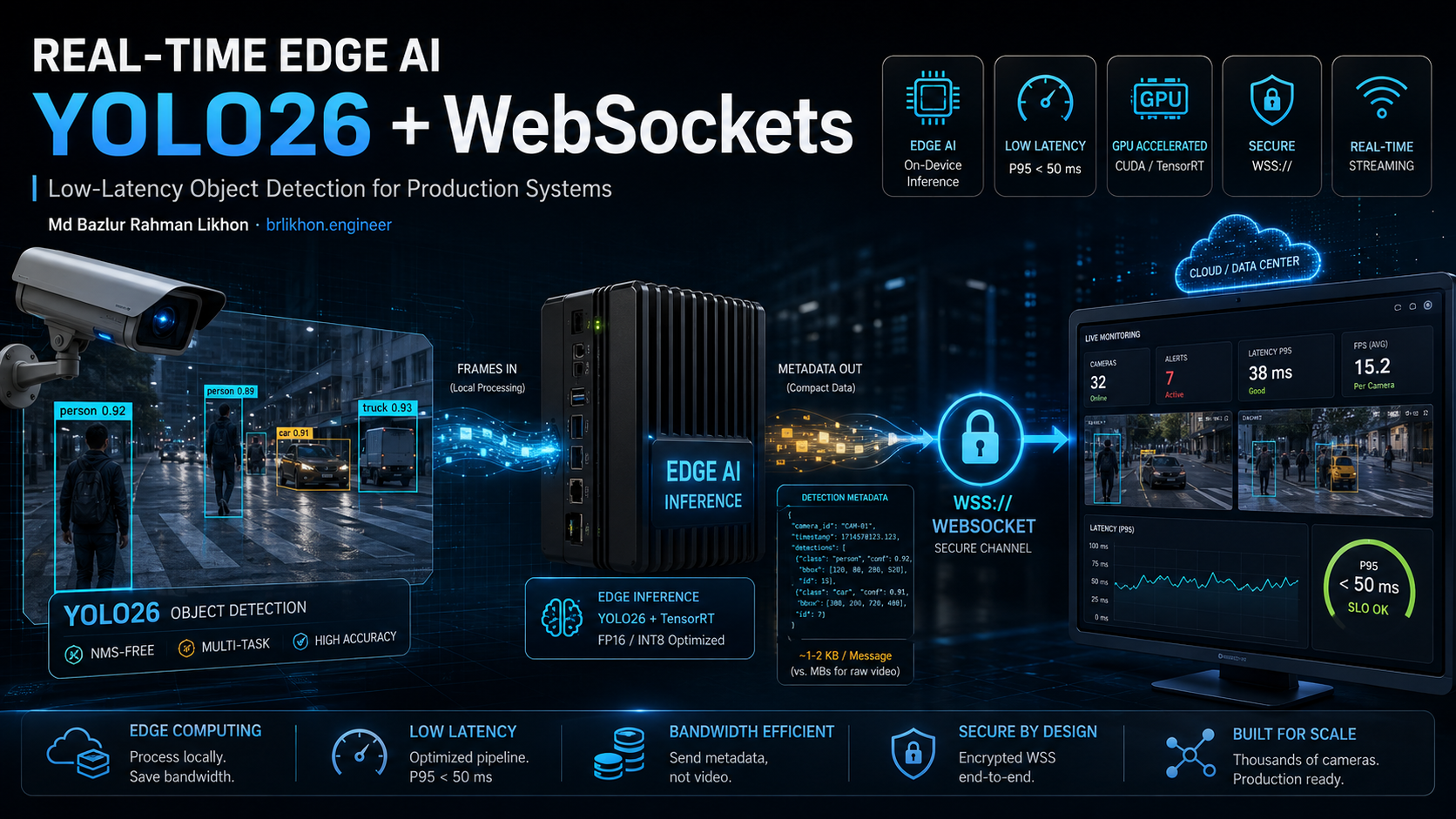
The camera remains close to the inference workload. The edge node processes frames locally and sends compact detection metadata rather than continuously shipping raw video to the cloud.
For modern deployments, YOLO26 is now the current Ultralytics model family, released in January 2026. Ultralytics documents native end-to-end inference, a lighter detection head, NMS-free default detection, multiple task types, and export paths including ONNX and TensorRT. (Ultralytics Docs)
The important part, however, is not the model name.
Production performance comes from the entire pipeline: capture, preprocessing, inference, postprocessing, serialization, transport, gateway processing, and presentation.
Why Process Video at the Edge?
Sending every camera frame to a centralized cloud service is often the wrong architecture.
A camera may produce:
1920 × 1080
30 FPS
24-bit RGB
Even before compression and protocol overhead, that represents a substantial continuous data stream.
If the application only needs:
person detected
bounding box
confidence
camera ID
timestamp
tracking ID
then transmitting the entire frame is unnecessary.
The edge architecture becomes:
flowchart LR
    A[Raw Video] --> B[Edge Node]
    B --> C[Inference]
    C --> D[Detection Metadata]
    D --> E[Cloud / Gateway]
Instead of:
flowchart LR
    A[Camera] --> B[Cloud]
    B --> C[Inference]
    C --> D[Dashboard]
The edge model provides several practical advantages:
- Lower network bandwidth
- Lower transport latency
- Reduced cloud processing cost
- Better resilience during network interruption
- Local processing of sensitive video
- More predictable scaling per camera
The trade-off is that every edge node becomes an operational system that needs compute, updates, monitoring, security, and lifecycle management.
That trade is usually worthwhile when latency, bandwidth, privacy, or camera count matters.
Define the SLO Before Writing the Inference Code
The first mistake in real-time vision projects is choosing a model before defining what "real-time" actually means.
Define:
Detection accuracy
Target FPS
End-to-end latency
Maximum acceptable P95 latency
Maximum acceptable P99 latency
Camera count per node
Network bandwidth
Maximum dropped-frame rate
CPU budget
GPU/NPU budget
For example:
Cameras:              8
Input:                1280 × 720
Target FPS:           15 FPS/camera
P95 inference:        < 50 ms
P99 inference:        < 80 ms
Dropped frames:       < 1%
Transport:            WSS
Payload:              Detection metadata
The exact values are workload-specific.
The important principle is:
Define the performance envelope before optimizing the implementation.
A published FPS number without hardware, model, resolution, runtime, precision, batch size, and measurement methodology is not a production benchmark.
The Production Pipeline
A practical pipeline is:
flowchart LR
    A[RTSP / USB Camera] --> B[Frame Capture]
    B --> C[Resize / Normalize]
    C --> D[YOLO26 Inference]
    D --> E[Postprocess]
    E --> F[Metadata Encoding]
    F --> G[WSS]
    G --> H[WebSocket Gateway]
    H --> I[Dashboard]
Each stage has its own latency.
Therefore:
End-to-end latency
=
Capture
+
Preprocessing
+
Inference
+
Postprocessing
+
Serialization
+
Network
+
Gateway
+
Rendering
This distinction becomes critical when optimizing.
A model that takes 15 ms to execute does not mean the application has 15 ms latency.
Capture Frames Efficiently
A minimal OpenCV capture loop looks like this:
import cv2

cap = cv2.VideoCapture("rtsp://camera.example.local/stream")

while True:
    ok, frame = cap.read()

    if not ok:
        break

    # Run preprocessing and inference here.

    cv2.imshow("Edge Vision", frame)

    if cv2.waitKey(1) & 0xFF == ord("q"):
        break

cap.release()
cv2.destroyAllWindows()
For production RTSP workloads, frame capture should be treated as a separate pipeline stage rather than allowing camera I/O to block inference indefinitely.
The architecture should tolerate:
Camera disconnect
Camera timeout
Malformed frame
Frame-rate changes
Network jitter
Stream restart
A dead camera should not bring down the entire inference service.
Use the Current YOLO26 Generation
Ultralytics currently documents YOLO26 as its newest YOLO family, released in January 2026. The detection models range from yolo26n.pt through yolo26x.pt, and the family supports detection, segmentation, pose estimation, classification, oriented detection, and other tasks. (Ultralytics Docs)
A minimal inference example:
from ultralytics import YOLO

model = YOLO("yolo26n.pt")

results = model("frame.jpg")
For an edge deployment, the smallest model is not automatically the correct model.
You should benchmark:
YOLO26n
YOLO26s
YOLO26m
or other appropriate variants against your actual scene.
The correct model is the smallest one that satisfies the required accuracy and latency envelope.
Why YOLO26's End-to-End Design Matters
YOLO26 introduces native end-to-end inference and a default one-to-one detection head that eliminates the traditional NMS stage for its standard detection path. Ultralytics also describes a lighter detection head and a DFL-free regression design aimed at deployment efficiency. (Ultralytics Docs)
That matters because production inference is not only:
Neural network execution
It is:
Neural network
+
Postprocessing
+
Memory movement
+
Serialization
+
Transport
Removing unnecessary postprocessing can simplify the critical path.
The correct question is not:
"How fast is YOLO26?"
The correct question is:
"How fast is my complete application when YOLO26 is one component of the pipeline?"
Normalize Detection Coordinates
A compact detection event can use normalized coordinates.
def normalize_box(x1, y1, x2, y2, width, height):
    return [
        x1 / width,
        y1 / height,
        x2 / width,
        y2 / height,
    ]
For example:
{
  "camera": "cam01",
  "sequence": 12345,
  "timestamp": 1750000000.123,
  "detections": [
    {
      "class": 0,
      "bbox": [0.12, 0.20, 0.45, 0.72],
      "confidence": 0.93
    }
  ]
}
This provides several benefits:
- Resolution independence
- Smaller payloads
- Easier client-side rendering
- Camera-agnostic representation
- Simpler protocol evolution
The browser can convert normalized coordinates back to pixels:
const x1 = bbox[0] * canvas.width;
const y1 = bbox[1] * canvas.height;
const x2 = bbox[2] * canvas.width;
const y2 = bbox[3] * canvas.height;
Add Sequence Numbers
Timestamps alone are not enough.
Every frame should have a monotonically increasing sequence number:
{
  "camera": "cam01",
  "sequence": 12345,
  "timestamp": 1750000000.123
}
The receiver can then identify:
12345
12346
12347
12349
and immediately know that sequence 12348 was lost.
This is particularly useful when the system intentionally drops stale frames during congestion.
For real-time computer vision, the latest frame is usually more valuable than an old frame.
JSON Is Fine for the Prototype
JSON is easy to inspect and debug.
Example:
{
  "camera": "cam01",
  "sequence": 12345,
  "detections": [
    {
      "class": 0,
      "bbox": [0.12, 0.20, 0.45, 0.72],
      "confidence": 0.93
    }
  ]
}
For production systems with high event rates, evaluate:
Protocol Buffers
CBOR
MessagePack
The correct decision depends on:
Message size
Messages/second
CPU cost
Serialization cost
Language support
Schema evolution
Debugging requirements
Do not switch to binary encoding because binary sounds more professional.
Measure the actual bottleneck.
Stream Metadata Through a WebSocket Gateway
WebSockets are a natural fit for browser dashboards and bidirectional control channels. MDN describes the API as a two-way interactive communication mechanism that avoids polling for server responses. (MDN Web Docs)
A basic Python client can publish metadata:
import asyncio
import json
import websockets

async def publish(uri, payload):
    async with websockets.connect(uri) as websocket:
        await websocket.send(json.dumps(payload))

payload = {
    "camera": "cam01",
    "sequence": 12345,
    "detections": []
}

asyncio.run(
    publish("wss://gateway.example.com/ws", payload)
)
For production, the connection should remain persistent rather than opening a new connection for every detection event.
The architecture should look like:
flowchart LR
    A[Edge Node] -->|WSS| B[WebSocket Gateway]
    B --> C[Authentication]
    C --> D[Authorization]
    D --> E[Metadata Router]
    E --> F[Dashboard]
    E --> G[Alerting]
    E --> H[Storage]
WebSocket Security Is Part of the Architecture
A WebSocket connection is not automatically secure merely because it uses the WebSocket protocol.
Production transport should use:
wss://
not:
ws://
OWASP explicitly recommends WSS for production and warns that unencrypted WebSockets allow traffic interception and tampering. (OWASP Cheat Sheet Series)
Use:
const socket = new WebSocket(
    "wss://gateway.example.com/ws"
);
TLS protects the transport, but it does not solve authorization.
The complete security model is:
TLS
 ↓
Origin Validation
 ↓
Authentication
 ↓
Authorization
 ↓
Message Validation
 ↓
Rate Limiting
 ↓
Backpressure
 ↓
Monitoring
Protect the Handshake Against Cross-Site WebSocket Hijacking
A browser may automatically include authentication cookies during a WebSocket handshake.
That creates a potential attack path:
User logs in
      ↓
Authenticated session cookie exists
      ↓
User visits malicious website
      ↓
Malicious JavaScript opens WebSocket
      ↓
Browser sends session cookie
      ↓
Server accepts connection
      ↓
Attacker gains authenticated WebSocket access
OWASP identifies this as Cross-Site WebSocket Hijacking (CSWSH) and recommends validating the Origin header against an explicit allowlist. (OWASP Cheat Sheet Series)
Use an allowlist:
ALLOWED_ORIGINS = {
    "https://app.example.com",
    "https://admin.example.com",
}

def valid_origin(origin: str) -> bool:
    return origin in ALLOWED_ORIGINS
Do not use:
if "example.com" in origin:
    allow()
Do not use a wildcard.
Do not trust arbitrary origins.
Authenticate the WebSocket Session
WebSockets do not provide application-level authentication automatically.
The server needs an explicit identity model.
For example:
Client
  ↓
TLS
  ↓
Authentication
  ↓
Authenticated Principal
  ↓
WebSocket Session
Long-lived connections create an additional problem: the session may expire while the socket remains open.
Therefore:
Session expires
      ↓
Revalidate
      ↓
Close WebSocket
      ↓
Require authentication again
OWASP recommends handling session expiration explicitly and closing connections when sessions become invalid. (OWASP Cheat Sheet Series)
Authorize Every Sensitive Action
Do not treat:
Authenticated connection
as:
Unlimited access
A message such as:
{
  "action": "subscribe",
  "camera": "cam01"
}
must be authorized against the authenticated user's permissions.
The server should determine:
Who is the user?
What tenant do they belong to?
Does the camera exist?
Is the camera accessible to this user?
Is the requested operation allowed?
The browser cannot be trusted to answer these questions.
OWASP recommends message-level authorization and specifically warns against assuming that an authenticated WebSocket connection grants unlimited access. (OWASP Cheat Sheet Series)
Validate Every Message
Every WebSocket message should be considered untrusted input.
Validate:
Message type
Schema
Field types
Field ranges
Payload size
Allowed actions
Resource ownership
Rate
For example:
{
  "action": "subscribe",
  "camera": "cam01"
}
can be constrained to:
action ∈ {subscribe, unsubscribe}
camera length ≤ 64
message size ≤ configured limit
camera belongs to authorized tenant
OWASP recommends schema validation, allowlists, message-size limits, safe deserialization, and rate limiting. (OWASP Cheat Sheet Series)
Never execute incoming data.
Do not use:
eval(message);
Parse it as data:
const message = JSON.parse(raw);
Backpressure Is a First-Class Requirement
The browser's standard WebSocket API does not provide automatic backpressure.
MDN explicitly documents the consequence: if messages arrive faster than the application can process them, buffering can consume memory or drive CPU usage high enough to make the application unresponsive. (MDN Web Docs)
For an edge-vision system, this is particularly important.
Suppose:
Producer: 30 detections/sec
Consumer: 10 detections/sec
An unbounded queue becomes:
20
40
60
80
100
...
Eventually the queue becomes a memory problem.
For real-time vision, use a bounded queue and discard stale frames:
New frame
   ↓
Queue full?
   ├── No → enqueue
   └── Yes → drop oldest
This is preferable to allowing a three-second-old detection to delay the current frame.
WebSocketStream and WebTransport
The standard WebSocket API remains the practical default when broad browser compatibility matters.
MDN documents WebSocketStream as a Streams API-based alternative with automatic backpressure, but it remains non-standard and has limited browser support. (MDN Web Docs)
WebTransport is now broadly available in modern browsers and provides HTTP/3-based transport with multiple streams, unidirectional streams, out-of-order delivery, and unreliable datagrams. (MDN Web Docs)
The choice is therefore workload-specific:
| Requirement | Preferred Transport |
|---|---|
| Broad browser compatibility | WebSocket |
| Standard persistent bidirectional channel | WebSocket |
| Stream-native backpressure in controlled environments | Evaluate WebSocketStream |
| HTTP/3 streams and datagrams | WebTransport |
| Unreliable high-frequency telemetry | Evaluate WebTransport |
For most browser dashboards, WebSocket remains a sensible default.
For sophisticated high-frequency transport requirements, WebTransport deserves evaluation rather than dismissal simply because the existing application already uses WebSockets.
Rate Limit Persistent Connections
WebSocket security is not complete without resource controls.
OWASP recommends limits for connections, message size, message rate, idle sessions, and resource consumption. (OWASP Cheat Sheet Series)
Implement:
Maximum connections per user
Maximum connections per tenant
Maximum message size
Maximum message rate
Idle timeout
Heartbeat
Queue limit
Example server policy:
Max payload:        64 KB
Idle timeout:       60 seconds
Heartbeat:          30 seconds
Per-user sockets:   5
Queue depth:        100
These values are examples, not universal constants.
Tune them against actual workload.
Optimize the Inference Runtime
Once the pipeline works, profile it.
Break the latency into:
Capture
Preprocessing
Inference
Postprocessing
Serialization
Network
Suppose the measurements are:
Capture:          3 ms
Preprocessing:    5 ms
Inference:       18 ms
Postprocessing:   2 ms
Serialization:    1 ms
Network:          7 ms
The inference stage dominates.
Optimize there.
If instead:
Capture:          3 ms
Preprocessing:   22 ms
Inference:       10 ms
Postprocessing:   2 ms
Serialization:    1 ms
Network:          7 ms
optimizing the neural network is not the first move.
This is why profiling beats intuition.
Export to ONNX
ONNX provides a portable model representation that can be consumed by optimized runtimes.
A typical pipeline is:
flowchart LR
    A[PyTorch / Ultralytics] --> B[ONNX Export]
    B --> C[ONNX Runtime]
    B --> D[TensorRT]
    C --> E[CPU / GPU]
    D --> F[NVIDIA GPU]
ONNX Runtime provides graph optimization and quantization capabilities, including dynamic and static INT8 quantization. Its documentation recommends selecting quantization strategy according to model type, hardware, and accuracy requirements. (ONNX Runtime)
For CNN-based object detection, static quantization can be appropriate when representative calibration data is available.
The workflow becomes:
FP32 Model
   ↓
Calibration
   ↓
INT8 Model
   ↓
Accuracy Validation
   ↓
Latency Validation
Never assume INT8 automatically improves the application.
Measure it.
TensorRT for NVIDIA GPUs
NVIDIA TensorRT is an inference optimization SDK designed to compile trained models into optimized GPU-specific engines. Current TensorRT documentation describes support for FP32, FP16, BF16, FP8, INT8, FP4, and INT4, together with dynamic shapes and specialized optimizations. (NVIDIA Docs)
A production path can be:
YOLO26
   ↓
ONNX
   ↓
TensorRT Builder
   ↓
Optimized Engine
   ↓
NVIDIA GPU
Verify the installed TensorRT version:
trtexec --help
or:
import tensorrt

print(tensorrt.__version__)
NVIDIA's current documentation explicitly recommends measuring latency and throughput on the actual model and hardware rather than assuming a generic benchmark applies to your deployment. (NVIDIA Docs)
Precision Optimization
A typical precision progression is:
FP32
  ↓
FP16
  ↓
INT8
But the correct deployment is the one that satisfies:
Accuracy requirement
+
Latency requirement
+
Hardware capability
TensorRT supports multiple mixed-precision modes, while ONNX Runtime provides INT8 and other quantization workflows. (NVIDIA Docs)
For each precision mode, record:
Accuracy
P50 latency
P95 latency
P99 latency
Throughput
GPU memory
Power
If INT8 produces a 2% accuracy loss but only saves 3 ms, it may not be worth the complexity.
Engineering is mostly trade-offs wearing nicer clothes.
Batch Size Is a Latency Decision
For offline inference:
Batch = 16
can improve throughput.
For real-time cameras:
Batch = 1
is often the natural starting point.
Micro-batching can increase hardware utilization when several cameras share a node, but it also introduces queueing latency.
The decision is:
More batching
    ↓
Potentially higher throughput
    ↓
Potentially higher latency
For strict latency SLOs, start with batch size 1 and measure.
Move Preprocessing Close to the Accelerator
Preprocessing can become surprisingly expensive.
Typical operations include:
Resize
Color conversion
Normalization
Memory copy
Tensor creation
A poorly designed pipeline may repeatedly move data:
Camera
 ↓
CPU
 ↓
GPU
 ↓
CPU
 ↓
GPU
Minimize unnecessary copies.
Prefer:
Camera
 ↓
CPU / DMA
 ↓
GPU preprocessing
 ↓
GPU inference
 ↓
GPU postprocessing
where the hardware and runtime support it.
The objective is not merely to maximize GPU utilization.
The objective is to minimize end-to-end latency per useful detection.
Avoid Unnecessary NMS Work
Traditional object-detection pipelines often contain:
Inference
 ↓
Decode
 ↓
NMS
 ↓
Results
YOLO26's default detection path uses an end-to-end NMS-free design, which can simplify deployment and reduce postprocessing. (Ultralytics Docs)
If a model or runtime still requires NMS, profile it.
Do not optimize NMS blindly.
Measure:
Inference
Postprocessing
NMS
Serialization
and target the dominant component.
Build a Real Benchmark
Use a representative video.
Do not benchmark on:
One static image
and call it real-time performance.
Replay a representative workload at the target frame rate:
Camera recording
      ↓
Capture pipeline
      ↓
Inference
      ↓
Transport
      ↓
Dashboard
Measure:
Capture latency
Preprocessing latency
Inference latency
Postprocessing latency
Serialization latency
Network latency
End-to-end latency
Dropped frames
Report:
P50
P95
P99
Automate the benchmark so every model or runtime change generates a measurable result.
Deploy the Edge Node as a Service
Containerization makes edge deployments easier to reproduce.
A minimal Dockerfile:
FROM python:3.12-slim

WORKDIR /app

COPY requirements.txt .

RUN pip install --no-cache-dir -r requirements.txt

COPY . .

CMD ["python", "main.py"]
For GPU deployments, the container image, NVIDIA driver, CUDA compatibility, TensorRT version, and host runtime must be tested as a single system.
A container that works on the development workstation but cannot initialize the production GPU is not a deployment artifact.
It is a souvenir.
Health Checks Matter
Expose a basic liveness endpoint:
@app.get("/healthz")
async def healthz():
    return {"status": "ok"}
Then add readiness:
/readyz
Readiness should verify relevant conditions such as:
Model loaded
Inference runtime initialized
Required configuration present
Required dependencies available
For AI services, a startup smoke test against a known image can verify that the model actually performs inference.
Handle GPU Failure
Hardware can fail.
A production edge system should have a defined degraded mode.
flowchart TD
    A[Inference Request] --> B{GPU Available?}
    B -->|Yes| C[GPU Model]
    B -->|No| D[CPU Fallback]
    C --> E[Detection Metadata]
    D --> E
    E --> F[WebSocket Gateway]
The fallback model does not necessarily need the same accuracy.
The goal is to preserve the application's core function.
For example:
GPU model:
High accuracy / high FPS

CPU fallback:
Lower accuracy / lower FPS
This can be preferable to complete service failure.
Observability for Edge AI
Monitor the complete pipeline.
At minimum:
Camera FPS
Inference FPS
P50 latency
P95 latency
P99 latency
Dropped frames
Queue depth
CPU utilization
GPU utilization
GPU memory
Network bandwidth
WebSocket connections
WebSocket errors
Authentication failures
Model failures
Container restarts
For multiple cameras, expose per-camera metrics.
For example:
camera_inference_fps{camera="cam01"}
camera_inference_fps{camera="cam02"}

camera_dropped_frames_total{camera="cam01"}

camera_inference_latency_seconds{camera="cam01"}
This makes a single failing camera visible without hiding it inside node-wide averages.
WebSocket Logging
Traditional HTTP access logs generally capture the initial WebSocket upgrade, not every message exchanged afterward.
OWASP recommends logging connection lifecycle, authentication, authorization, validation failures, rate-limit events, abnormal closures, and protocol errors while avoiding sensitive message contents and credentials. (OWASP Cheat Sheet Series)
Good:
{
  "event": "websocket_auth_failed",
  "user": "user-123",
  "origin": "https://unknown.example",
  "reason": "invalid_session"
}
Bad:
{
  "event": "websocket_message",
  "token": "eyJhbGciOi..."
}
Never log credentials simply because the logger technically can.
Failure Recovery
A resilient edge system should define recovery behavior.
Camera Failure
Camera disconnect
      ↓
Retry
      ↓
Backoff
      ↓
Reconnect
      ↓
Resume sequence
WebSocket Failure
Connection lost
      ↓
Bounded reconnect
      ↓
Re-authenticate
      ↓
Resume subscription
Gateway Overload
Queue full
      ↓
Drop stale events
      ↓
Preserve latest state
GPU Failure
GPU unavailable
      ↓
CPU fallback
      ↓
Lower inference rate
      ↓
Alert operations
The system should fail according to policy, not according to whichever component happens to panic first.
Security and Privacy at the Edge
Edge AI does not eliminate security responsibilities.
Protect:
Camera credentials
Model artifacts
Device identity
Network credentials
WebSocket credentials
Stored metadata
Logs
Remote management interfaces
Use:
TLS
Device authentication
Least privilege
Network segmentation
Secure secret storage
Signed container images where appropriate
Audit logging
Regular patching
For sensitive workloads, avoid transmitting raw images unless they are actually required.
If raw video must leave the edge:
Encrypt
Authenticate
Authorize
Minimize retention
Restrict access
Audit access
For biometric and surveillance applications, additional privacy and regulatory requirements may apply. The architecture should document those requirements rather than assuming generic security controls are sufficient.
JSON vs Binary Metadata
A useful migration path is:
Prototype
   ↓
JSON
   ↓
Measure
   ↓
Bandwidth / CPU bottleneck?
   ↓
Protocol Buffers / CBOR / MessagePack
JSON should remain the default until measurement proves it is a bottleneck.
Binary protocols become valuable when:
Message rate is high
Payloads are large
Bandwidth is constrained
CPU serialization cost matters
Schema stability matters
Do not optimize payload encoding before measuring the actual transport cost.
When WebSockets Stop Being Enough
WebSockets are excellent for:
Browser dashboards
Interactive monitoring
Bidirectional control
Moderate-rate telemetry
Live event feeds
They are not automatically the ideal internal transport for every distributed system.
At larger scale, consider:
WebSocket
    ↓
Gateway
    ↓
Kafka / MQTT / NATS / Pub/Sub
    ↓
Analytics
The browser-facing WebSocket can remain simple while the internal architecture handles durable streaming, fan-out, replay, and analytics separately.
This separation is especially useful when one detection event must feed:
Dashboard
Alerting
Data warehouse
Time-series database
Audit system
Machine-learning pipeline
The Production Architecture
Putting the pieces together:
flowchart TB
    A[IP Cameras] --> B[Edge Capture]
    B --> C[Preprocessing]
    C --> D[YOLO26 Inference]
    D --> E[Postprocessing]
    E --> F[Detection Metadata]
    F --> G[WSS Gateway]

    G --> H[Authentication]
    H --> I[Authorization]
    I --> J[Schema Validation]
    J --> K[Rate Limiting]
    K --> L[Backpressure]

    L --> M[Dashboard]
    L --> N[Alerting]
    L --> O[Analytics]

    D --> P[Inference Metrics]
    G --> Q[WebSocket Metrics]
    B --> R[Camera Health]
This architecture separates the major responsibilities:
Camera acquisition
Inference
Metadata generation
Secure transport
Identity
Authorization
Flow control
Presentation
Analytics
Observability
That separation is what makes the system operable.
Performance Optimization Checklist
| Layer | Optimization |
|---|---|
| Camera | Use appropriate resolution and FPS |
| Capture | Avoid blocking the inference loop |
| Preprocessing | Minimize CPU-GPU copies |
| Model | Benchmark appropriate YOLO26 variant |
| Precision | Evaluate FP16 and INT8 |
| Runtime | Evaluate ONNX Runtime / TensorRT |
| Postprocessing | Profile NMS or model-specific decoding |
| Serialization | Start with JSON, optimize only when measured |
| Transport | Use WSS |
| Queue | Use bounded buffering |
| Backpressure | Drop stale frames when appropriate |
| Network | Minimize metadata payload |
| Operations | Monitor P95/P99 latency |
| Recovery | Implement degraded modes |
What Should Actually Be Optimized?
The correct optimization order is:
1. Measure
2. Identify dominant bottleneck
3. Optimize that bottleneck
4. Measure again
5. Validate accuracy
6. Validate reliability
7. Deploy
Not:
1. Change model
2. Change runtime
3. Add GPU
4. Add Kafka
5. Add Kubernetes
6. Discover the camera is dropping frames
Architecture should follow evidence.
Common Mistakes
Sending Raw Video to the Cloud by Default
If the cloud only needs detection metadata, raw video creates unnecessary bandwidth and processing requirements.
Using WebSocket Without Origin Validation
TLS does not prevent Cross-Site WebSocket Hijacking.
Treating Authentication as Authorization
An authenticated user may still be forbidden from accessing a specific camera or executing a specific action.
Allowing Unbounded Queues
Eventually the queue becomes a memory leak with better branding.
Benchmarking Only Inference
Users experience end-to-end latency, not just GPU kernel latency.
Publishing Vendor FPS as Your Production FPS
Vendor benchmarks are reference measurements. Your hardware and workload determine your actual performance.
Optimizing Before Profiling
If preprocessing consumes more time than inference, replacing the model will not fix the bottleneck.
Retaining Raw Video Without a Requirement
Sensitive data should not be collected or retained simply because storage is cheap.
Recommended Production Sequence
A practical implementation sequence is:
Phase 1
Requirements + SLOs
        ↓
Phase 2
Single-camera prototype
        ↓
Phase 3
YOLO26 benchmark
        ↓
Phase 4
ONNX / TensorRT optimization
        ↓
Phase 5
WSS gateway
        ↓
Phase 6
Authentication + authorization
        ↓
Phase 7
Backpressure + failure handling
        ↓
Phase 8
Multi-camera deployment
        ↓
Phase 9
Observability
        ↓
Phase 10
Load testing + production rollout
Do not begin with Kubernetes.
First prove that one camera works correctly.
Then prove that one node can sustain the required workload.
Then scale the architecture.
Key Takeaways
- Process video at the edge when latency, bandwidth, privacy, or resilience justify it.
- Transmit compact detection metadata instead of raw video when the application does not require the frames.
- Use YOLO26 or another model based on measured accuracy and latency, not model popularity.
- Use ONNX Runtime or TensorRT when runtime optimization provides a measurable benefit.
- Treat preprocessing, inference, postprocessing, serialization, and network transfer as separate latency components.
- Use WSS, explicit origin validation, authentication, authorization, message validation, rate limiting, and bounded queues for production WebSockets.
- Design backpressure deliberately. Real-time systems should prefer fresh information over stale queues.
- Measure P50, P95, and P99 latency and dropped frames, not just average FPS.
- Build observability and failure recovery into the architecture rather than adding them after the first incident.
FAQ
Should edge AI send video or detection metadata?
Send detection metadata when the central application only requires object classes, bounding boxes, confidence scores, tracking information, counts, or alerts.
Send raw video only when centralized processing, recording, human review, forensic analysis, or another explicit requirement justifies the bandwidth and privacy cost.
Is YOLO26 the best object-detection model for every edge deployment?
No.
YOLO26 is the current Ultralytics model family and provides a strong modern deployment option, but model selection should be based on the accuracy, latency, hardware, memory, and operational requirements of the actual workload. Ultralytics itself recommends both YOLO26 and YOLO11 for stable production workloads. (Ultralytics Docs)
Should I use TensorRT or ONNX Runtime?
Use the runtime that performs best for the target hardware and workload.
For NVIDIA GPUs, TensorRT is specifically designed for optimized GPU inference. ONNX Runtime provides a broader runtime abstraction and quantization/optimization capabilities. (NVIDIA Docs)
Benchmark both where the deployment justifies the comparison.
Should production metadata use JSON?
JSON is an excellent starting point.
Move to Protocol Buffers, CBOR, MessagePack, or another compact encoding when message size, serialization cost, or bandwidth becomes a measured bottleneck.
Should every detection frame be delivered?
Not necessarily.
For real-time systems, stale information is often less useful than current information.
A bounded queue with controlled frame dropping can produce better operational behavior than guaranteed delivery of every obsolete frame.
Is WebSocket secure by default?
No.
Use WSS, validate origins, authenticate clients, authorize actions, validate messages, limit resources, and monitor the connection lifecycle. OWASP explicitly documents these requirements for production WebSocket systems. (OWASP Cheat Sheet Series)
Should WebTransport replace WebSockets?
Not automatically.
WebTransport provides HTTP/3-based streams and datagrams and is now broadly available in modern browsers, but WebSockets remain simpler and broadly compatible. Choose WebTransport when its specific transport capabilities justify the additional architectural complexity. (MDN Web Docs)
Conclusion
A production real-time computer-vision system is not simply a YOLO model connected to a camera.
It is a distributed system.
The model is only one component:
Camera
 ↓
Capture
 ↓
Preprocessing
 ↓
Inference
 ↓
Postprocessing
 ↓
Metadata
 ↓
Secure Transport
 ↓
Authentication
 ↓
Authorization
 ↓
Backpressure
 ↓
Dashboard / Analytics
 ↓
Observability
The most effective architecture is usually the one that keeps the latency-sensitive computation close to the data source, transmits only the information the application actually needs, and makes failure behavior explicit.
Modern models such as YOLO26 make the inference layer more deployment-friendly, while ONNX Runtime and TensorRT provide optimization paths for different hardware targets. (Ultralytics Docs)
But no model, runtime, or protocol removes the need for engineering discipline.
Measure the complete pipeline. Secure the transport. Authorize every operation. Bound every queue. Monitor every critical path. And optimize only what the measurements prove is slow.
That is how an edge-AI prototype becomes a production system.
References
-
Ultralytics — YOLO26 Documentation https://docs.ultralytics.com/models/yolo26/ (Ultralytics Docs)
-
Ultralytics — Supported YOLO Models https://docs.ultralytics.com/models/ (Ultralytics Docs)
-
OWASP — WebSocket Security Cheat Sheet https://cheatsheetseries.owasp.org/cheatsheets/WebSocket_Security_Cheat_Sheet.html (OWASP Cheat Sheet Series)
-
MDN — WebSocket API https://developer.mozilla.org/en-US/docs/Web/API/WebSockets_API (MDN Web Docs)
-
MDN — WebSocketStream https://developer.mozilla.org/en-US/docs/Web/API/WebSocketStream (MDN Web Docs)
-
MDN — WebTransport API https://developer.mozilla.org/en-US/docs/Web/API/WebTransport_API (MDN Web Docs)
-
ONNX Runtime — Quantize ONNX Models https://onnxruntime.ai/docs/how-to/quantization.html (ONNX Runtime)
-
NVIDIA — TensorRT Documentation https://docs.nvidia.com/deeplearning/tensorrt/latest/ (NVIDIA Docs)
-
NVIDIA — TensorRT Quick Start Guide https://docs.nvidia.com/deeplearning/tensorrt/latest/getting-started/quick-start-guide.html (NVIDIA Docs)
-
Google Search Central — Creating Helpful, Reliable, People-First Content https://developers.google.com/search/docs/fundamentals/creating-helpful-content (Google for Developers)
-
Google Search Central — SEO Starter Guide https://developers.google.com/search/docs/fundamentals/seo-starter-guide (Google for Developers)
-
Source Architecture — Edge Vision Playbook The original supplied draft establishes the staged architecture of requirements, prototype, model/runtime optimization, resilient WebSocket streaming, deployment, observability, and privacy for this article.