By Md. Bazlur Rahman Likhon | Senior Cloud & AI Engineer | brlikhon.engineer
Last updated: August 16, 2026
The AI Architecture Shift Most Developers Are Missing
For most of the generative AI era, we trained developers to think about intelligence as an API call.
Your application collected some data, sent it to a server, waited for an AI model to process it, paid for the request, and displayed the result.
That architecture still makes sense for many workloads.
But in 2026, it is no longer the only serious architecture available.
A modern smartphone can perform OCR, translation, speech recognition, object detection, pose estimation, segmentation, embeddings, text generation, summarization, image understanding, text-to-speech, speaker identification, wake-word detection, and even local LLM inference without requiring every operation to reach a cloud model.
The important change is not simply that phones became faster.
The ecosystem changed.
Google ML Kit, Huawei ML Kit, MediaPipe, LiteRT, LiteRT-LM, ExecuTorch, ONNX Runtime, Apple Core ML, Apple Foundation Models, Qualcomm AI Hub, sherpa-onnx, llama.cpp, MLC LLM, PaddleOCR, Transformers.js, WebLLM, ncnn, MNN, Vosk and whisper.cpp now give builders multiple layers of reusable AI infrastructure.
That creates a completely different engineering question:
Instead of asking "Which AI API should I use?", builders should increasingly ask "Which capabilities should run locally, which runtime should execute them, and when should the cloud become a fallback?"
That distinction can determine your application's latency, privacy, offline capability and operating economics.
Executive Summary
My engineering position for 2026 is straightforward:
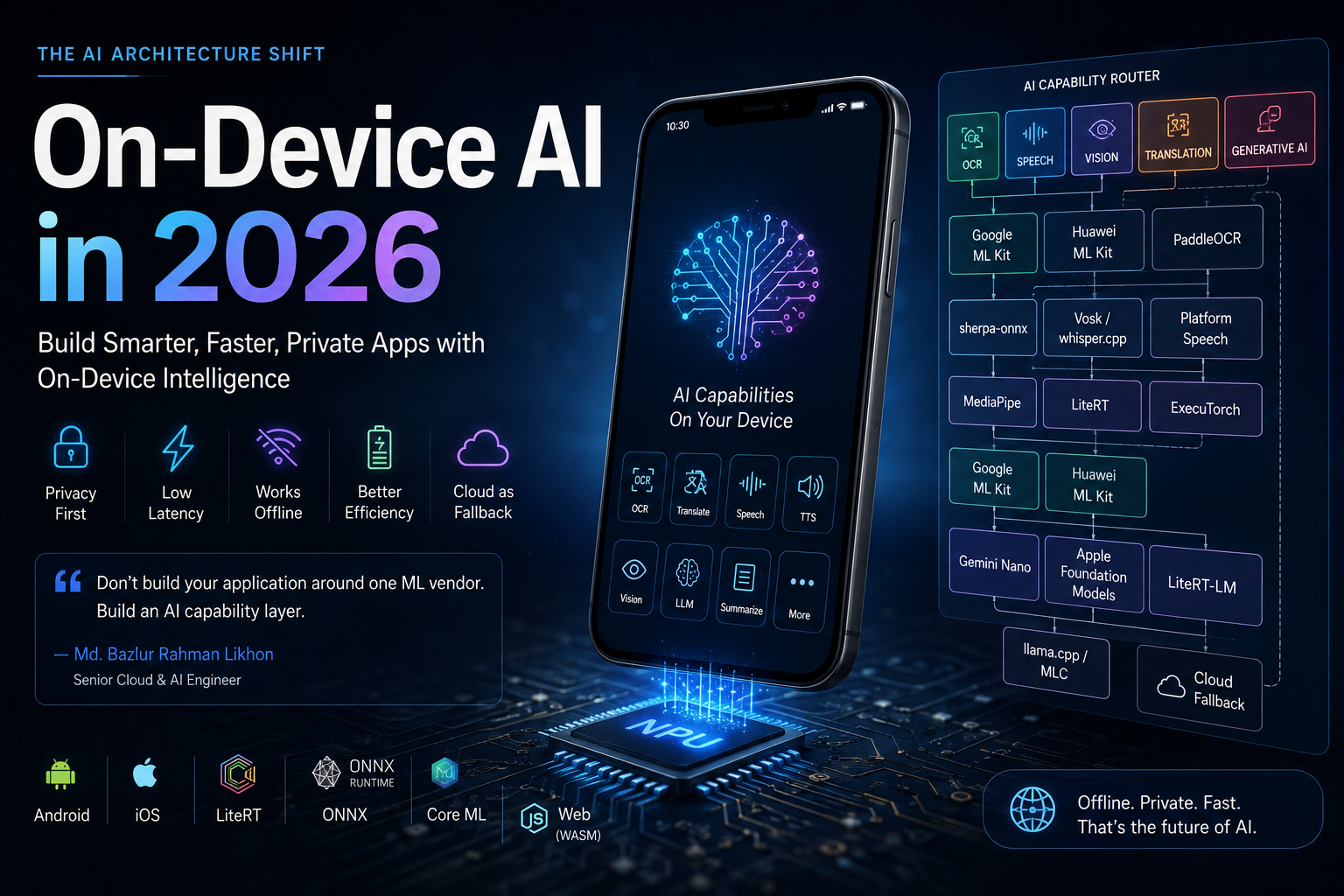
Do not build your application around one ML vendor. Build an AI capability layer.
A production application should ideally be able to route tasks such as:
OCR
Translation
Speech Recognition
Text-to-Speech
Object Detection
Pose Detection
Image Segmentation
Embedding
Summarization
Structured Extraction
Local LLM Inference
to different engines depending on:
- Device capability
- Operating system
- Available RAM
- NPU/GPU support
- Model availability
- Required accuracy
- Privacy requirements
- Internet connectivity
- Latency target
- Battery state
- Licensing
- Cloud cost
The architecture starts looking less like this:
Application
    ↓
One AI Provider
    ↓
Everything
and more like this:
flowchart TD
    A[Application] --> B[AI Capability Router]

    B --> C[OCR]
    B --> D[Speech]
    B --> E[Vision]
    B --> F[Translation]
    B --> G[Generative AI]

    C --> H[Google ML Kit]
    C --> I[Huawei ML Kit]
    C --> J[PaddleOCR]

    D --> K[sherpa-onnx]
    D --> L[Vosk or whisper.cpp]
    D --> M[Platform Speech]

    E --> N[MediaPipe]
    E --> O[LiteRT]
    E --> P[ExecuTorch]

    F --> H
    F --> I

    G --> Q[Gemini Nano]
    G --> R[Apple Foundation Models]
    G --> S[LiteRT-LM]
    G --> T[llama.cpp or MLC]

    B --> U[Cloud Fallback]
That is the architecture I would design around.
First: What Does "On-Device AI" Actually Mean?
The term is frequently used too loosely.
There are at least four different architectures hiding behind it.
1. Bundled On-Device Model
The model ships inside your application package.
App
 ↓
Bundled Model
 ↓
CPU / GPU / NPU
Advantages:
- Works immediately offline
- Predictable model version
- No model download dependency
Disadvantages:
- Larger application
- Every model update can require an application update
- Large models can make distribution painful
2. Downloadable On-Device Model
Your application downloads a model when the user needs the feature.
Install App
    ↓
User activates feature
    ↓
Download model
    ↓
Run locally thereafter
This is common for translation packs, handwriting models and generative AI models.
It provides a useful compromise:
small application download + local inference after activation.
3. System-Provided AI
The operating system or device provides the model.
Your application communicates with a system framework rather than packaging the model itself.
Google's Gemini Nano integration through AICore is an important example.
Google's current ML Kit GenAI APIs expose capabilities including:
- Summarization
- Proofreading
- Rewriting
- Image description
- Prompt-based generation
through Gemini Nano on supported Android hardware.
The model is managed through Android's AI infrastructure rather than every application independently shipping another copy.
Google ML Kit GenAI documentation
4. Hybrid Local + Cloud AI
This is often the strongest production design.
Request
   ↓
Can device execute locally?
   ↓
YES ─────────→ Local inference
   │
   NO
   ↓
Cloud model
Or more intelligently:
Sensitive data?
   ↓ YES
Prefer local

Large reasoning workload?
   ↓ YES
Prefer cloud

Offline?
   ↓ YES
Require local

Low-end device?
   ↓ YES
Use lightweight model or cloud
On-device and cloud AI should not be treated as enemies.
They are different execution tiers.
The 2026 On-Device AI Stack Has Four Layers
I divide the ecosystem into four major layers.
| Layer | Purpose | Examples |
|---|---|---|
| Turnkey AI APIs | Solve common AI tasks quickly | Google ML Kit, Huawei ML Kit, Apple Vision |
| Task frameworks | Specialized reusable AI pipelines | MediaPipe, PaddleOCR, sherpa-onnx |
| Model runtimes | Execute your own models | LiteRT, ExecuTorch, ONNX Runtime, ncnn, MNN |
| Foundation-model runtimes | Execute local LLM/VLM workloads | Gemini Nano, Apple Foundation Models, LiteRT-LM, llama.cpp, MLC |
Understanding which layer you are choosing matters enormously.
An ML Kit API solves a predefined problem.
A runtime gives you freedom to define the problem.
Google ML Kit: The Strongest General-Purpose Starting Point for Android
Google's current ML Kit documentation makes an unusually important statement:
ML Kit's APIs are offered at no cost and run on-device.
That makes ML Kit one of the most attractive starting points for mobile developers who need commonly used AI capabilities without creating their own inference infrastructure.
Current ML Kit capabilities include areas such as:
- Text Recognition
- Face Detection
- Face Mesh
- Pose Detection
- Selfie Segmentation
- Subject Segmentation
- Document Scanning
- Barcode Scanning
- Image Labeling
- Object Detection and Tracking
- Digital Ink Recognition
- Language Identification
- Translation
- Smart Reply
- Entity Extraction
- Custom models
And ML Kit now has a second layer:
on-device generative AI.
Gemini Nano Changes What "ML Kit" Means
Historically, ML Kit primarily meant deterministic machine-learning tasks.
Input:
Camera frame
Output:
Detected objects
or:
Image
Output:
Recognized text
Gemini Nano introduces generative behavior.
Google currently exposes feature-specific GenAI APIs for:
- Summarization
- Proofreading
- Rewriting
- Image description
and a more flexible Prompt API for custom text and multimodal interactions.
The Prompt API also supports structured output, making local extraction workflows possible.
Conceptually:
Receipt image
   ↓
OCR
   ↓
Gemini Nano
   ↓
Structured object

{
  merchant,
  date,
  items,
  total,
  currency
}
Google documents structured generation for tasks including classification and entity extraction.
This is significant.
You can increasingly combine:
deterministic ML + generative reasoning
inside the same mobile application.
But Gemini Nano Is Not "Every Android Phone"
This is where architectural discipline matters.
Traditional ML Kit has very broad Android reach.
Gemini Nano does not.
The current GenAI APIs have specific supported-device requirements, and Google maintains compatibility lists by feature.
Therefore never design:
App depends entirely on Gemini Nano
without defining a fallback.
Better:
Gemini Nano available?
      ↓
      YES → Local GenAI
      NO  → Smaller local model or cloud
That distinction is critical for applications targeting emerging markets where inexpensive Android devices matter.
Huawei ML Kit: Much More Than a Huawei-Phone Feature
Huawei ML Kit remains interesting because it covers several domains particularly well:
- OCR and document recognition
- Face/body analysis
- Image intelligence
- Speech
- Translation
- Text-to-speech
- Custom model deployment
Huawei provides both on-device and cloud-backed services.
This distinction matters economically.
Huawei's Android documentation explicitly says enabling ML Kit in AppGallery Connect is required for its on-cloud services, but is not necessary simply to use on-device services.
Huawei's language and voice stack includes capabilities such as:
- Automatic speech recognition
- Real-time transcription
- Audio-file transcription
- Translation
- On-device translation
- Language detection
- Text-to-speech
- On-device text-to-speech
That makes Huawei particularly interesting for voice and multilingual applications.
Huawei ML Kit Is Not Entirely "Unlimited Free"
This deserves precision.
Huawei has on-device features where processing occurs locally, but it also operates cloud services with quotas and billing.
For example, Huawei's current pricing documentation lists a monthly free quota for cloud real-time translation and charges after that threshold.
At the time of this update, Huawei lists:
500,000 characters per month free for cloud real-time translation, followed by usage-based pricing.
Pricing can change, so production teams should always check current regional pricing before forecasting.
The architectural lesson is more important than the exact number:
On-device Huawei capability
        ≠
Huawei cloud capability
Do not mix them when estimating cost.
Apple Has Built Its Own Complete On-Device AI Stack
Apple's ecosystem deserves separate treatment because Apple does not package everything under one "ML Kit" brand.
Instead, developers combine frameworks.
Depending on the use case, these include:
- Vision
- Natural Language
- Speech
- Translation
- Core ML
- Foundation Models
Apple's Vision framework covers computer-vision capabilities including:
- Text recognition
- Face analysis
- Image analysis
- Body pose
- Hand pose
- Object tracking
- Barcode recognition
Its Translation framework enables application-level translation.
Core ML is Apple's deployment layer for custom models.
And Foundation Models changes the generative side of the stack.
Apple Foundation Models Brings the System LLM to Developers
Apple's Foundation Models framework gives Swift developers access to the foundation model capabilities provided through Apple Intelligence.
Apple currently describes support for tasks including:
- Text generation
- Summarization
- Entity extraction
- Text understanding
- Image understanding
- Refinement
- Dialogue
- Structured generation
- Tool calling
Apple Foundation Models documentation
Apple has also expanded the framework so applications can work with multiple model providers through a common Swift-oriented architecture.
For Apple-first products, this dramatically changes what can be implemented without immediately creating a server-side LLM dependency.
MediaPipe: One of the Most Valuable Libraries Mobile Builders Underuse
If ML Kit gives you convenient AI functions, MediaPipe gives you perception primitives.
That distinction matters.
MediaPipe provides reusable tasks across vision, text and audio.
Vision capabilities include areas such as:
- Hand landmarks
- Face landmarks
- Pose landmarks
- Gesture recognition
- Object detection
- Image segmentation
- Image classification
This enables products where the camera becomes a continuous sensor.
MediaPipe Holistic Is Essentially a Human-Motion Sensor
MediaPipe's Holistic Landmarker combines:
- 33 pose landmarks
- 468 face landmarks
- 21 landmarks per hand
for a total of 543 landmarks across a person.
That is not simply "face detection."
It is enough information to build applications around:
- Fitness coaching
- Exercise-form analysis
- Gesture control
- Avatar animation
- Sign-language interfaces
- Rehabilitation
- Sports analytics
- Posture monitoring
- Virtual try-on
- Human-computer interaction
And it can operate against a continuous video stream.
That opens an entirely different class of application than a cloud chatbot.
PaddleOCR Has Evolved Into Document AI
PaddleOCR is another technology I would place on every serious AI builder's radar.
It is no longer only:
Image → text
The current PaddleOCR ecosystem includes:
- OCR
- Document preprocessing
- Layout analysis
- Table understanding
- Formula recognition
- Chart understanding
- Reading-order restoration
- Information extraction
- Document translation
- Document-to-Markdown workflows
PP-StructureV3, for example, combines document-layout understanding with table, formula and reading-order processing.
PaddleOCR-VL goes further by using a compact vision-language architecture for complex document parsing.
Its current documentation describes support for text, tables, formulas and charts across a highly multilingual document environment.
For builders working on:
- Invoice automation
- Bank-statement processing
- Resume parsing
- Receipt extraction
- Contract digitization
- Form processing
- Document search
- PDF intelligence
PaddleOCR is far more relevant than many developers realize.
Voice AI Has Its Own On-Device Ecosystem
Voice applications require several separate capabilities.
A serious voice system may need:
Microphone
   ↓
Voice Activity Detection
   ↓
Speech Recognition
   ↓
Punctuation
   ↓
Speaker Identification
   ↓
Language Detection
   ↓
LLM / Intent Engine
   ↓
Text-to-Speech
Cloud providers can supply all of these.
But they are no longer the only option.
sherpa-onnx Is a Complete Local Voice Toolbox
One of the strongest open-source projects in this area is sherpa-onnx.
Its current ecosystem covers areas including:
- Streaming speech recognition
- Offline speech recognition
- Text-to-speech
- Voice activity detection
- Keyword spotting
- Speaker diarization
- Speaker identification
- Punctuation
- Spoken-language identification
- Audio tagging
- Hotword/contextual biasing
It targets environments including Android, HarmonyOS, iOS, Flutter, desktop and embedded workflows.
This means you can build:
offline speech products without paying an API provider for every second of audio.
Examples:
- Meeting transcription
- Voice-note applications
- Offline assistants
- Voice-command systems
- Speaker-separated transcripts
- Dictation
- Accessibility applications
- Wake-word interfaces
Speaker Diarization Is More Valuable Than It Sounds
Speech recognition answers:
What was said?
Speaker diarization answers:
Who spoke when?
A meeting system can therefore generate:
Speaker 1: We need to launch by Monday.

Speaker 2: The Android build is ready.

Speaker 3: I still need to finish QA.
rather than one uninterrupted transcript.
sherpa-onnx includes speaker-diarization support and pretrained speaker-related models.
sherpa-onnx speaker diarization
For meeting AI, interviews, call-center analytics and multi-speaker transcription, that difference is fundamental.
Vosk Remains Useful for Lightweight Offline ASR
Vosk is an older but still useful offline speech-recognition option.
Its project supports:
- Streaming recognition
- Multiple languages
- Reconfigurable vocabulary
- Speaker-related functionality
- Android
- iOS
- Raspberry Pi
- Server environments
It is not the solution I would automatically choose for every new speech project, but it remains relevant when:
small models and lightweight offline recognition matter more than frontier accuracy.
whisper.cpp Gives Whisper a Local Runtime
whisper.cpp brings Whisper-style speech recognition into a lightweight C/C++ execution environment.
It supports model quantization, reducing model memory and storage requirements.
This makes it attractive when you want:
- Offline transcription
- Cross-platform deployment
- Control over model execution
- No per-minute transcription API bill
Again, the right ASR engine depends on the language, device and latency target.
There is no single universal winner.
The Next Layer: Bring Your Own Model
Everything above still gives you predefined capabilities.
What happens when you want to build something specific?
For example:
Detect damaged mango leaves
Recognize garment defects
Classify industrial machine sounds
Identify local crop disease
Detect a custom document type
Recognize a proprietary gesture
Analyze medical-device imagery
You need a runtime.
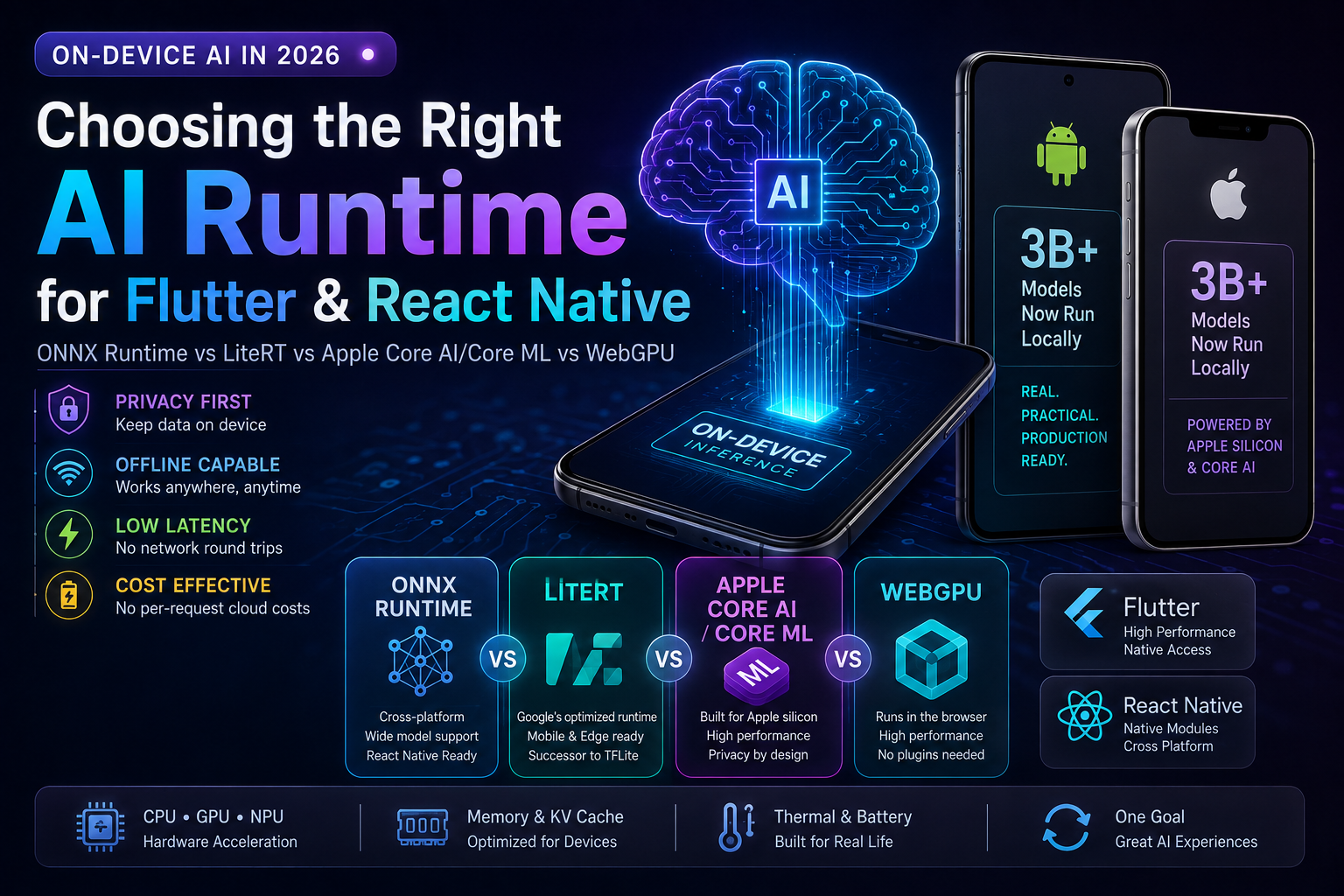
This is where LiteRT, ExecuTorch, ONNX Runtime, ncnn and MNN become strategically important.
LiteRT: Google's Main On-Device Model Runtime
LiteRT is Google's current high-performance on-device machine-learning framework and the successor evolution of TensorFlow Lite.
Google describes LiteRT as supporting ML and GenAI deployment across edge platforms.
On Android, its modern CompiledModel path is designed to streamline acceleration across:
- CPU
- GPU
- NPU
That means your architecture can become:
Custom PyTorch/TensorFlow model
        ↓
Convert / optimize
        ↓
LiteRT
        ↓
CPU / GPU / NPU
        ↓
Application
This frees you from whatever tasks Google chooses to expose through ML Kit.
ML Kit says:
Here are the ML problems we solved for you.
LiteRT says:
Bring the model you want.
That is a fundamentally different level of control.
LiteRT-LM Brings Local LLM Execution Into the Same Ecosystem
Google now has LiteRT-LM, an orchestration layer specifically designed for running language models with LiteRT.
Google describes it as a production-oriented, cross-platform LLM runtime layer.
This matters because normal neural-network inference and LLM inference have different runtime requirements.
An LLM needs things such as:
- Tokenization
- KV-cache management
- Sampling
- Streaming
- Prompt handling
- Multistep generation
- Memory management
LiteRT-LM handles more of that orchestration.
It also extends beyond Android into broader deployment scenarios, including emerging WebGPU execution.
ExecuTorch: The PyTorch-Native Edge Stack
If your models originate in PyTorch, ExecuTorch should be on your shortlist.
ExecuTorch is PyTorch's end-to-end on-device inference system.
It targets:
- Mobile phones
- Wearables
- Embedded devices
- Microcontrollers
- Edge hardware
The flow looks like:
PyTorch
   ↓
torch.export
   ↓
ExecuTorch lowering
   ↓
Optimized .pte program
   ↓
Device runtime
ExecuTorch also supports hardware-specific backends and exposes Android APIs through Java/Kotlin integration.
If your ML engineering organization already lives in PyTorch, this can reduce the gap between research and deployment.
ONNX Runtime Mobile: The Interoperability Layer
ONNX Runtime Mobile deserves attention because it solves a different problem:
framework interoperability.
Microsoft's ONNX Runtime can execute models originating from ecosystems including:
- PyTorch
- TensorFlow/Keras
- TFLite
- scikit-learn
- ONNX-native workflows
Its mobile runtime targets both Android and iOS.
That gives teams an architecture like:
Training Framework
       ↓
      ONNX
       ↓
ONNX Runtime Mobile
       ↓
Android / iOS
This is extremely valuable when you don't want deployment architecture tightly coupled to the training framework.
Qualcomm AI Hub: Where Hardware Optimization Becomes Real
Running a model on Android is one thing.
Running it efficiently on a Snapdragon NPU is another.
Qualcomm AI Hub helps bridge that gap.
Qualcomm currently advertises 300+ ML and GenAI models optimized for supported devices.
Its tooling lets developers:
- Convert models
- Optimize models
- Compile for Qualcomm hardware
- Validate models
- Profile real-device performance
Metrics can include factors such as:
- Runtime
- Model load time
- Compute-unit utilization
That matters because "runs on device" is not enough.
Production requirements are closer to:
Runs fast enough without destroying battery life or thermal stability.
CPU, GPU and NPU Are Not Interchangeable
The hardware layer matters.
CPU
Best for:
- General compatibility
- Smaller models
- Control-heavy workloads
- Fallback execution
Weakness:
- Often less energy-efficient for sustained neural-network inference
GPU
Best for:
- Parallel numerical workloads
- Vision models
- Some generative workloads
Weakness:
- Competes with graphical rendering
- Can consume significant power
NPU
Best for:
- Neural-network workloads optimized for supported operators
- Low-power sustained inference
- Modern mobile AI
Weakness:
- Hardware-specific
- Operator support varies
- Deployment toolchains are more complex
The same model can have radically different behavior depending on which backend actually executes it.
llama.cpp: Local LLMs Without a Heavy Framework
llama.cpp is one of the technologies that made practical local LLM inference accessible to a much larger developer audience.
Its goal is efficient LLM and VLM inference across a very wide range of hardware.
It is particularly valuable because of the GGUF ecosystem and strong quantization support.
Conceptually:
Large model
   ↓
Quantization
   ↓
Smaller GGUF model
   ↓
llama.cpp
   ↓
CPU / GPU
This can turn a model that would otherwise require datacenter hardware into something usable on:
- laptops
- desktops
- higher-end mobile devices
- edge computers
depending on model size and quantization.
MLC LLM: Compile LLMs for the Target Platform
MLC LLM approaches the problem more like a compiler stack.
It is designed to optimize and deploy language models across different environments.
That includes environments such as:
- Mobile
- Desktop
- GPU platforms
- Web-based environments
Its Apache-2.0 runtime license also makes it attractive for experimentation and product integration, subject to the separate license of the model being executed.
ncnn: Small, Efficient and Battle-Tested
Tencent's ncnn focuses heavily on efficient mobile and embedded inference.
Its design characteristics include:
- No heavyweight third-party runtime dependency
- CPU execution
- Vulkan GPU support
- Mobile optimization
- Model conversion tooling
Tencent states that ncnn has been used in products including WeChat and QQ.
For applications where runtime footprint matters, ncnn remains a serious option.
MNN: Alibaba's Mobile and Edge Runtime
Alibaba's MNN is another lightweight inference framework targeting local AI.
Its ecosystem now includes local LLM-oriented capabilities as well.
Alibaba even maintains an example Android 3D-avatar application combining:
Local LLM
+
ASR
+
TTS
+
Audio-to-Facial Animation
+
Neural Rendering
into a fully local architecture.
That should tell builders something important:
on-device AI is no longer limited to one tiny classifier running beside your app.
Entire multimodal pipelines are becoming possible.
The Browser Has Become an AI Runtime
One of the biggest architectural changes is happening outside native mobile apps.
The browser itself can now execute meaningful AI workloads.
That means:
Website
   ↓
Browser
   ↓
WebGPU / WASM
   ↓
Local model
No dedicated inference server is required for some workloads.
Transformers.js
Hugging Face Transformers.js lets developers run Transformer models directly in JavaScript.
It supports many task families, depending on the selected model, such as:
- Classification
- Embeddings
- Translation
- Summarization
- Image processing
- Audio processing
- Text generation
WebGPU enables compatible models to use the browser's GPU for accelerated computation.
That creates a powerful product pattern:
User visits site
      ↓
Model downloads
      ↓
Model cached locally
      ↓
Inference occurs in browser
Your server does not necessarily process every request.
WebLLM Takes Browser AI Further
WebLLM is specifically designed for running LLMs inside browsers using WebGPU.
It provides:
- Local browser inference
- Streaming
- WebGPU acceleration
- OpenAI-compatible APIs
- JSON mode
- Function calling
- Web Worker support
The API compatibility is particularly interesting.
You could architect:
const provider = deviceSupportsWebGPU()
  ? localWebLLM
  : cloudLLM;

const response = await provider.chat.completions.create({
  messages: [
    {
      role: "user",
      content: "Summarize this document"
    }
  ]
});
Your application logic can remain similar while execution moves between:
local browser model and cloud model.
That is an important architectural pattern.
The Full Capability Map for Builders
Here is how I think about the ecosystem.
| Capability | Strong Starting Points |
|---|---|
| OCR | Google ML Kit, Huawei ML Kit, Apple Vision, PaddleOCR |
| Document scanning | Google ML Kit, Apple Vision |
| Complex document parsing | PaddleOCR |
| Barcode/QR | Google ML Kit, Huawei ML Kit, Apple Vision |
| Translation | Google ML Kit, Huawei ML Kit, Apple Translation |
| Language identification | Google ML Kit, Huawei ML Kit, MediaPipe |
| Speech recognition | sherpa-onnx, whisper.cpp, Vosk, Huawei ML Kit, native platform APIs |
| Voice activity detection | sherpa-onnx |
| Speaker diarization | sherpa-onnx |
| Speaker identification | sherpa-onnx, Vosk-related workflows |
| Keyword/wake-word detection | sherpa-onnx |
| Text-to-speech | sherpa-onnx, Huawei ML Kit, platform TTS |
| Face detection | Google ML Kit, Huawei ML Kit, MediaPipe, Apple Vision |
| Face landmarks | MediaPipe, Huawei, Apple Vision |
| Hand landmarks | MediaPipe, Apple Vision |
| Pose estimation | MediaPipe, Google ML Kit, Apple Vision |
| Object detection | ML Kit, MediaPipe, custom models |
| Segmentation | ML Kit, MediaPipe, custom models |
| Custom vision model | LiteRT, ExecuTorch, ONNX Runtime, ncnn, MNN |
| Local embeddings | LiteRT, ONNX, Transformers.js, custom model |
| Local text generation | Gemini Nano, Apple Foundation Models, LiteRT-LM, llama.cpp, MLC |
| Browser LLM | WebLLM, Transformers.js |
| Browser embeddings | Transformers.js |
| NPU optimization | LiteRT, Qualcomm AI Hub, platform runtimes |
| Custom PyTorch deployment | ExecuTorch |
| Framework-neutral deployment | ONNX Runtime |
| Lightweight mobile inference | ncnn, MNN |
| Multilingual document AI | PaddleOCR |
There is no reason your product must choose only one.
The "Free AI" Question Needs Better Language
Developers often ask:
"Can I use this AI for free?"
That question combines several different costs.
You need to separate:
API Cost
Does each inference trigger a paid server request?
Runtime License
Are you allowed to embed the runtime commercially?
Model License
Are you allowed to redistribute and commercially use the model weights?
Distribution Cost
How much bandwidth does downloading a 500 MB or 2 GB model create?
Device Cost
How much memory, battery and storage does inference consume?
Engineering Cost
How much device-specific optimization and QA do you need?
A better statement is:
On-device inference can eliminate per-request cloud inference fees, but it does not make AI software costless.
That is a much more accurate engineering model.
Google ML Kit Is an Interesting Exception
Google currently describes its ML Kit APIs as being offered at no cost and running on-device.
For common capabilities, that can be economically powerful.
Imagine an application performing:
50 OCR scans/user/day
×
1,000,000 users
That would be:
50,000,000 OCR operations/day
If each operation required a paid cloud API, variable inference cost would scale with usage.
If those operations execute locally through a suitable on-device API:
Cloud inference requests ≈ 0
That does not mean your total infrastructure cost is zero.
But it changes the economics radically.
A Better Cost Formula
Cloud-first AI often behaves roughly like:
Monthly AI Cost
≈
Users
×
AI Actions per User
×
Unit API Cost
Local-first AI looks more like:
Monthly AI Cost
≈
Model Distribution
+
Telemetry
+
Fallback Cloud Usage
+
Engineering
+
Support
Your marginal inference cost can become dramatically smaller.
That matters enormously at scale.
Runtime License and Model License Are Different
This is one of the easiest mistakes to make.
Suppose a runtime is Apache-2.0.
That does not automatically mean the model you downloaded is Apache-2.0.
You must check both.
Examples of runtime/project licenses include:
| Project | Runtime/Project License |
|---|---|
| sherpa-onnx | Apache-2.0 |
| Vosk | Apache-2.0 |
| PaddleOCR | Apache-2.0 |
| MLC LLM | Apache-2.0 |
| MNN | Apache-2.0 |
| ONNX Runtime | MIT |
| llama.cpp | MIT |
| ncnn | BSD-3-Clause |
| ExecuTorch | BSD-style |
Official repositories:
But then separately ask:
What license are the model weights?

Can they be redistributed?

Can they be used commercially?

Is attribution required?

Are there acceptable-use restrictions?

Can they be modified?

Can they be hosted?

Can outputs be used commercially?
Never ship a model because the runtime around it has a permissive license.
The Architecture I Recommend
I would build an abstraction layer rather than calling vendor SDKs from business logic.
Conceptually:
class AIEngine {
  async ocr(input, options) {}
  async translate(text, options) {}
  async transcribe(audio, options) {}
  async synthesizeSpeech(text, options) {}
  async detectObjects(frame, options) {}
  async estimatePose(frame, options) {}
  async embedText(text, options) {}
  async generate(prompt, options) {}
}
Underneath:
const providers = {
  ocr: [
    googleMLKit,
    huaweiMLKit,
    paddleOCR,
    cloudOCR
  ],

  speech: [
    sherpaOnnx,
    whisperLocal,
    platformSpeech,
    cloudSpeech
  ],

  vision: [
    mediaPipe,
    liteRT,
    executorch,
    cloudVision
  ],

  generation: [
    geminiNano,
    appleFoundationModels,
    liteRTLM,
    llamaCpp,
    cloudLLM
  ]
};
Then selection happens dynamically.
Capability Routing Should Be Policy Driven
A routing policy might consider:
async function chooseProvider(capability, context) {
  const candidates = providers[capability];

  return candidates
    .filter(provider => provider.isAvailable(context.device))
    .filter(provider => provider.supports(context.language))
    .filter(provider => provider.memoryRequirement <= context.availableMemory)
    .sort((a, b) => {
      return score(b, context) - score(a, context);
    })[0];
}
Where score() evaluates:
Privacy
Latency
Accuracy
Offline availability
Memory
Energy
Cost
Hardware acceleration
Model readiness
This is much more resilient than hardcoding:
google.translate(...)
throughout the application.
Production Architecture
A mature system could look like this:
flowchart TD
    A[Mobile / Web Application] --> B[Capability API]

    B --> C[Device Profiler]
    B --> D[Policy Engine]

    C --> E[RAM]
    C --> F[CPU GPU NPU]
    C --> G[OS Version]
    C --> H[Installed Models]
    C --> I[Network State]

    D --> J[Privacy Policy]
    D --> K[Latency Target]
    D --> L[Cost Policy]
    D --> M[Quality Requirement]

    C --> N[Provider Router]
    D --> N

    N --> O[Google ML Kit]
    N --> P[Huawei ML Kit]
    N --> Q[MediaPipe]
    N --> R[sherpa-onnx]
    N --> S[LiteRT]
    N --> T[ExecuTorch]
    N --> U[ONNX Runtime]
    N --> V[Local LLM Runtime]

    N --> W[Cloud Fallback]

    O --> X[Unified Result]
    P --> X
    Q --> X
    R --> X
    S --> X
    T --> X
    U --> X
    V --> X
    W --> X
Business logic never needs to know which engine executed the request.
That gives you vendor flexibility.
Build an Internal Capability Contract
For example, your OCR result should not expose Google-specific classes.
Instead normalize it.
{
  text: "Invoice Total: $1,240.00",

  blocks: [
    {
      text: "Invoice Total",
      confidence: 0.97,
      boundingBox: {
        x: 120,
        y: 412,
        width: 280,
        height: 42
      }
    }
  ],

  metadata: {
    provider: "google_mlkit",
    execution: "on_device",
    latencyMs: 43
  }
}
Tomorrow you could replace Google with Huawei or PaddleOCR without rewriting the UI or database model.
This is basic software architecture applied to AI.
And it becomes more important as the number of AI providers grows.
Local-First Does Not Mean Local-Only
I strongly recommend avoiding ideological architecture.
Do not decide:
Everything must run locally.
And do not decide:
Everything belongs in the cloud.
Instead decide workload by workload.
Use Local When
- Data is sensitive
- Latency must be extremely low
- Offline operation matters
- Request volume is massive
- The model is relatively small
- The task is repetitive
- Device hardware is sufficient
- Cloud cost would become significant
Use Cloud When
- The model is too large
- Strong reasoning is required
- Device capability is unknown
- Accuracy matters more than privacy/latency
- Models change frequently
- Centralized observability matters
- Workload requires large context
- User demand is low enough that API economics remain favorable
Use Hybrid When
You are building almost anything serious.
Example: Live Translation
A modern translator could combine multiple providers.
flowchart LR
    A[Microphone] --> B[VAD]
    B --> C[Streaming ASR]
    C --> D[Language Detection]
    D --> E[Translation]
    E --> F[TTS]
    F --> G[Speaker]

    C --> H[Live Captions]

    B -. local .-> I[sherpa-onnx]
    E -. local .-> J[Google or Huawei ML Kit]
    F -. local .-> K[Local TTS]
Possible stack:
VAD            → sherpa-onnx
ASR            → sherpa-onnx / whisper.cpp / platform speech
Translation    → Google ML Kit / Huawei ML Kit
TTS            → sherpa-onnx / Huawei / system TTS
No single ML Kit needs to provide everything.
Example: Meeting Intelligence
Microphone
   ↓
VAD
   ↓
ASR
   ↓
Speaker Diarization
   ↓
Transcript
   ↓
Local LLM
   ↓
Summary + Tasks + Decisions
Potential stack:
sherpa-onnx
    +
Gemini Nano / local LLM
Possible outputs:
Meeting summary
Decisions
Action items
Deadlines
Speaker-specific notes
Searchable transcript
Cloud inference can remain an optional quality-enhancement tier.
Example: Intelligent Document Scanner
flowchart TD
    A[Camera] --> B[Document Detection]
    B --> C[Perspective Correction]
    C --> D[OCR]
    D --> E[Layout Parsing]
    E --> F[Structured Extraction]
    F --> G[Local LLM]
    G --> H[JSON / Database]
Possible technologies:
Google ML Kit
+
PaddleOCR
+
Gemini Nano
or:
Apple Vision
+
Core ML
+
Foundation Models
Possible applications:
- Invoice processing
- Expense management
- Identity-document workflows
- Contract search
- Receipt analysis
- Logistics documentation
- SME bookkeeping
Example: AI Fitness Coach
Camera
   ↓
MediaPipe Pose
   ↓
Body Landmarks
   ↓
Movement Logic
   ↓
Exercise Classification
   ↓
Real-Time Coaching
You don't need to stream someone's workout video to a GPU server just to count squats.
That is exactly the type of workload that should often remain local.
Example: Accessibility Assistant
Camera
   ↓
OCR + Object Detection
   ↓
Image Understanding
   ↓
Natural-Language Description
   ↓
TTS
Possible technologies:
ML Kit
+
Gemini Nano
+
System TTS
or:
Apple Vision
+
Foundation Models
+
Speech
This can become:
- Text reader
- Scene describer
- Product reader
- Sign reader
- Navigation assistant
with less data leaving the device.
Example: Fully Local Voice Assistant
Consider:
Wake Word
   ↓
ASR
   ↓
Local LLM
   ↓
Tool Router
   ↓
TTS
Potential stack:
sherpa-onnx
+
LiteRT-LM / llama.cpp / MLC
+
local TTS
No cloud is required for basic interactions.
You can then selectively escalate complex requests:
Local model confidence low?
         ↓
Cloud fallback
That gives you privacy without sacrificing capability.
Browser AI Creates a New SaaS Model
Imagine a SaaS product where:
10,000 users
×
100 AI requests/day
=
1,000,000 AI requests/day
Traditional architecture:
Browser
  ↓
Your API
  ↓
GPU provider
  ↓
Response
You pay for inference.
Browser-local architecture:
Browser
  ↓
WebGPU
  ↓
User's GPU
  ↓
Response
Your server may primarily distribute:
- Model metadata
- Application assets
- Authentication
- Updates
rather than performing every inference.
That changes SaaS economics.
But there are tradeoffs:
- Large initial downloads
- Browser compatibility
- Hardware variability
- Memory constraints
- Model theft/extraction risk
- User battery/power usage
- Cache-management complexity
There is no free lunch.
But there is a new option.
What You Should Benchmark
Never select a local AI engine because a demo looked fast.
Benchmark it.
For Every Model
Measure:
- Model size
- Download size
- Peak RAM
- Initialization time
- Warm inference latency
- Cold inference latency
- CPU utilization
- GPU utilization
- NPU utilization
- Battery impact
- Thermal behavior
- Accuracy
- Failure rate
For LLMs
Measure:
Time to first token
Tokens per second
Peak RAM
Context-length degradation
Prompt processing speed
Output quality
A local LLM producing:
2 tokens/second
may technically "work" but create terrible UX.
For Speech Recognition
Measure:
Real-time factor
Word error rate
First partial latency
Final transcript latency
CPU usage
Memory
Language accuracy
Noise robustness
The most accurate transcription model is useless for live captions if it cannot sustain real-time processing.
For Vision
Measure:
Frames per second
Per-frame latency
Precision
Recall
Battery drain
Thermal throttling
Camera pipeline overhead
A pose detector that performs at:
60 FPS for 20 seconds
but drops to:
12 FPS after thermal throttling
is not a 60 FPS production solution.
Device Fragmentation Is the Real Enemy
Cloud infrastructure provides controlled hardware.
Mobile does not.
You may encounter:
2 GB RAM budget
4 GB RAM
6 GB RAM
8 GB RAM
12 GB RAM
16 GB RAM
combined with:
Different CPU generations
Different GPUs
Different NPUs
Different drivers
Different Android releases
Different vendor firmware
Different thermal envelopes
Therefore I recommend defining device tiers.
Example Device-Tier Strategy
Tier A — High-End AI Device
Capabilities:
Local LLM
Large vision model
Continuous speech
NPU acceleration
Multimodal GenAI
Tier B — Mainstream Device
Capabilities:
ML Kit
MediaPipe
Small ASR
Translation
Small custom model
Tier C — Low-End Device
Capabilities:
Lightweight OCR
Barcode
Simple vision
System TTS
Cloud fallback for heavy AI
Then route automatically.
The Provider Router Becomes a Product Asset
At first this abstraction feels like extra engineering.
Later it becomes strategic.
Imagine Google releases a significantly better local model.
You add:
provider_google_v2
Huawei improves an offline translation model.
You add:
provider_huawei_v2
A Snapdragon device has a much faster optimized model.
You route:
Qualcomm device
→ Qualcomm optimized model
A low-end phone cannot run any local GenAI.
You route:
Cloud
Your product survives ecosystem change because your business logic does not depend on one vendor.
Security Still Matters On Device
Local inference improves privacy, but it does not automatically make an application secure.
You still need to protect:
- Local model files
- Cached prompts
- Transcripts
- Extracted OCR data
- Embeddings
- Conversation history
- Debug logs
- Temporary audio
- Generated files
A privacy claim such as:
"Your data never leaves your phone"
requires auditing every path.
For example:
Inference → local
Analytics → cloud
Crash log → cloud
Transcript backup → cloud
means some user information may still leave the device.
Privacy architecture must include the whole application.
Local Models Also Create Intellectual-Property Risk
When you ship model weights to a device, assume a sufficiently motivated user can extract them.
Encryption and packaging can increase effort.
They do not create perfect secrecy.
Therefore if the model itself represents major proprietary IP, consider whether local deployment is acceptable.
This is another reason hybrid architectures matter.
Model Updates Need Versioning
Treat models as production artifacts.
Each model should have:
model_id
version
checksum
size
minimum_device_tier
minimum_os
runtime
license
language_support
accuracy_metrics
release_date
rollback_version
Example:
{
  modelId: "speech-en-v3",
  version: "3.2.1",
  runtime: "sherpa-onnx",
  quantization: "int8",
  downloadSizeMB: 142,
  minimumRamMB: 2048,
  sha256: "...",
  license: "model-specific"
}
Do not treat downloaded model files like random assets.
Treat them like deployable software.
Build a Model Registry
A robust application architecture can maintain:
Model Registry
│
├── OCR
│   ├── google_builtin
│   └── custom_litert_v2
│
├── Speech
│   ├── sherpa_en
│   ├── sherpa_bn
│   └── whisper_small
│
├── Translation
│   ├── google
│   └── huawei
│
└── LLM
    ├── gemini_nano
    ├── local_2b
    └── cloud_frontier
Your application can then fetch policy remotely without forcing a new application release.
Don't Ship Every Runtime
This is another common mistake.
After reading about all these tools, developers may want to package:
ML Kit
MediaPipe
LiteRT
ONNX Runtime
ExecuTorch
llama.cpp
sherpa-onnx
PaddleOCR
into one application.
Don't.
Every framework can add:
- Binary size
- Native libraries
- Startup complexity
- Dependency conflicts
- Security surface
- QA requirements
Choose the smallest stack that satisfies the product.
The abstraction layer should make providers replaceable.
It does not mean every provider must ship simultaneously.
My Recommended Starting Stacks
General Android AI Application
Start with:
Google ML Kit
+
MediaPipe
+
LiteRT
Add other runtimes only when requirements justify them.
Voice-Heavy Android Application
Start with:
sherpa-onnx
+
Google/Huawei translation
+
Local/system TTS
Add:
LiteRT-LM or cloud LLM
if reasoning is required.
Document AI Product
Start with:
Google ML Kit
+
PaddleOCR
+
Local/cloud LLM
Google handles simple scanning and recognition well.
PaddleOCR handles more complex document structure.
Computer-Vision Product
Start with:
MediaPipe
+
LiteRT
Use MediaPipe for standard human/vision primitives.
Use LiteRT for proprietary models.
PyTorch Organization
Start with:
ExecuTorch
especially if your models are already developed and evaluated in PyTorch.
Cross-Framework Organization
Investigate:
ONNX Runtime
because it gives you a neutral deployment representation.
Snapdragon-Heavy Android Market
Add:
Qualcomm AI Hub
to optimize and benchmark device-specific deployments.
Local LLM Application
Evaluate:
Gemini Nano
LiteRT-LM
llama.cpp
MLC LLM
depending on:
- Device coverage
- Model freedom
- Platform
- Required control
iOS-First Application
Use:
Vision
+
Core ML
+
Translation
+
Speech
+
Foundation Models
before introducing another runtime unnecessarily.
Browser AI Product
Evaluate:
Transformers.js
+
WebLLM
with a cloud fallback for unsupported browsers or weak hardware.
My Recommended 80/20 Android Stack
If I were starting a general Android AI platform today, I would not begin with fifteen frameworks.
I would begin with:
Google ML Kit
    ↓
Common AI APIs

MediaPipe
    ↓
Human + real-time perception

LiteRT
    ↓
Custom models

sherpa-onnx
    ↓
Advanced local voice

Cloud AI
    ↓
Heavy reasoning fallback
Then introduce:
Huawei ML Kit
ONNX Runtime
ExecuTorch
Qualcomm optimization
local LLM runtimes
only where they create measurable value.
That keeps complexity under control.
A Practical Decision Tree
flowchart TD
    A[Need an AI capability] --> B{Turnkey ML Kit API exists?}

    B -->|Yes| C{Quality sufficient?}
    C -->|Yes| D[Use Turnkey On-Device API]
    C -->|No| E[Evaluate Custom Model]

    B -->|No| E

    E --> F{Model already PyTorch?}
    F -->|Yes| G[Evaluate ExecuTorch]
    F -->|No| H{ONNX available?}

    H -->|Yes| I[Evaluate ONNX Runtime]
    H -->|No| J[Evaluate LiteRT / Native Runtime]

    D --> K{Heavy GenAI required?}
    G --> K
    I --> K
    J --> K

    K -->|No| L[Ship Local Pipeline]
    K -->|Yes| M{Supported system model available?}

    M -->|Yes| N[Gemini Nano / Apple Foundation Models]
    M -->|No| O{Device powerful enough?}

    O -->|Yes| P[Local LLM Runtime]
    O -->|No| Q[Cloud Fallback]
The principle is simple:
use the highest-level abstraction that satisfies your requirements.
Do not deploy a custom neural network when ML Kit already solves the problem well.
And do not remain trapped inside ML Kit when your product requires something more specialized.
The Bigger Business Opportunity
The most interesting part of this transition is not technological.
It is economic.
For the last few years many AI startups have effectively been:
UI
+
Cloud model API
+
Database
Their gross margin depends heavily on someone else's inference price.
On-device AI introduces another model:
UI
+
Local models
+
Device compute
+
Selective cloud
Now your users provide much of the inference hardware.
That does not eliminate infrastructure.
But it can fundamentally change the unit economics of:
- Translation
- OCR
- Transcription
- Image analysis
- Classification
- Summarization
- Personal AI
- Document intelligence
- Accessibility
- Education
- Fitness
- Productivity applications
Bangladesh and Emerging Markets Make This Even More Interesting
In markets where:
- connectivity can be inconsistent,
- users are price sensitive,
- cloud billing in USD matters,
- privacy-sensitive workloads are growing,
- Android dominates many user segments,
local-first AI can create particularly meaningful advantages.
Imagine:
Agriculture
Camera
→ crop image
→ local disease classifier
→ recommendation
Education
Textbook image
→ OCR
→ local explanation
→ local translation
SME Accounting
Receipt
→ OCR
→ expense extraction
→ accounting record
Healthcare support
Local image/sensor model
→ preliminary classification
→ cloud escalation where appropriate
Accessibility
Camera
→ scene/text understanding
→ speech
Language products
Bangla speech
→ transcription
→ translation
→ speech
The local ecosystem enables AI products whose economics would look very different if every interaction generated a cloud bill.
But "Local AI" Is Not Automatically Better AI
There are real disadvantages.
Local models are often:
- Smaller
- Less capable
- Harder to update
- More sensitive to hardware
- More constrained by memory
- More difficult to observe
- More difficult to debug remotely
- More difficult to benchmark consistently
A frontier cloud model can still outperform a tiny local model dramatically.
Therefore the strongest architecture is often:
Local intelligence
        +
Cloud intelligence
        =
Adaptive intelligence
Think of the Device as Tier Zero of Your AI Infrastructure
Traditional architecture:
Client
   ↓
API Gateway
   ↓
Cloud AI
I prefer thinking in tiers.
flowchart TD
    A[User Request] --> B[Tier 0: Device AI]

    B --> C{Solved locally?}

    C -->|Yes| D[Return Result]
    C -->|No| E[Tier 1: Edge / Small Cloud Model]

    E --> F{Solved?}

    F -->|Yes| D
    F -->|No| G[Tier 2: Frontier Cloud Model]

    G --> D
This architecture allows:
- inexpensive requests to remain local,
- medium workloads to use smaller infrastructure,
- difficult reasoning to reach frontier models.
That is how I expect sophisticated AI applications to evolve.
The Metrics I Would Put on the Architecture Dashboard
For each AI capability, track:
| Metric | Why it matters |
|---|---|
| Local execution rate | How often cloud was avoided |
| Cloud fallback rate | Determines variable cost |
| p50 latency | Typical user experience |
| p95 latency | Bad-case user experience |
| Model download success | Feature activation reliability |
| Model size | Storage and bandwidth |
| Peak RAM | Device compatibility |
| Battery impact | User retention |
| Thermal throttling | Sustained performance |
| Accuracy | Product quality |
| Provider failure rate | Reliability |
| Cost per active user | Business viability |
This turns on-device AI from an experiment into an operational system.
What I Would Not Do
I would not:
- Build business logic directly against one vendor SDK
- Assume "on-device" means every device supports it
- Assume "open source" means every model is commercially usable
- Assume local inference means zero operational cost
- Ship multi-gigabyte models without download strategy
- Benchmark only on flagship phones
- Ignore battery and thermal performance
- Mix cloud and local privacy claims
- Depend entirely on beta GenAI APIs without fallback
- Ship five runtimes when one would work
- Treat model files as unmanaged static assets
Those decisions create technical debt very quickly.
The Builder Stack I Would Watch Closely Through 2026
If you are trying to understand where practical edge AI is moving, watch these ecosystems:
Google ML Kit + Gemini Nano
Because it gives mainstream Android applications increasingly powerful system-managed AI.
LiteRT + LiteRT-LM
Because Google is consolidating custom on-device ML and LLM deployment around this stack.
MediaPipe
Because real-time human perception remains one of the strongest local-AI application categories.
ExecuTorch
Because PyTorch-native deployment dramatically matters to ML engineering teams.
ONNX Runtime
Because interoperability remains strategically valuable.
Qualcomm AI Hub
Because efficient AI ultimately depends on exploiting hardware correctly.
sherpa-onnx
Because voice applications need much more than simple speech-to-text.
PaddleOCR
Because document AI is becoming a full multimodal extraction pipeline.
Transformers.js + WebLLM
Because browsers are becoming legitimate inference environments.
The Strategic Conclusion
We are entering a phase where AI infrastructure is moving onto the client.
Not all of it.
Not the largest models.
Not every reasoning workload.
But enough of it to change how applications should be designed.
The architectural mistake would be treating Google ML Kit, Huawei ML Kit, MediaPipe, ONNX Runtime or LiteRT as competing products where you must choose one winner.
They occupy different layers.
A better mental model is:
Application
    ↓
AI Capability Layer
    ↓
Policy Router
    ↓
┌────────────────────────────────────┐
│ Google ML Kit                      │
│ Huawei ML Kit                      │
│ Apple Frameworks                   │
│ MediaPipe                          │
│ PaddleOCR                          │
│ sherpa-onnx                        │
│ LiteRT                             │
│ ExecuTorch                         │
│ ONNX Runtime                       │
│ llama.cpp / MLC                    │
│ Browser AI                         │
│ Cloud AI                           │
└────────────────────────────────────┘
Choose execution dynamically.
Keep common operations local.
Keep sensitive information local where possible.
Use hardware acceleration intelligently.
Use cloud models where their capability justifies the cost.
And never let your product architecture become permanently dependent on one AI provider.
The strongest AI application architecture in 2026 is not cloud-first or device-first. It is capability-first.
That is the important shift.
The device is no longer simply a screen connected to your AI infrastructure.
The device is part of the AI infrastructure.
Key Takeaways
- Google ML Kit is an unusually strong general starting point because its current mobile APIs are offered at no cost and execute on-device.
- Huawei ML Kit provides strong speech, translation, OCR and vision capabilities, but cloud services must be distinguished from local execution.
- MediaPipe gives builders powerful real-time perception capabilities for hands, faces, body pose, gestures and segmentation.
- PaddleOCR has evolved from OCR into sophisticated document parsing and understanding.
- sherpa-onnx can provide a substantial offline voice stack including ASR, TTS, VAD, diarization and keyword spotting.
- LiteRT gives Google-oriented teams a modern runtime for custom local models across CPU, GPU and NPU.
- ExecuTorch provides a strong deployment path for PyTorch-native teams.
- ONNX Runtime Mobile is valuable when interoperability matters.
- Qualcomm AI Hub helps bridge the gap between a model that runs and a model optimized for real mobile hardware.
- Gemini Nano, Apple Foundation Models, LiteRT-LM, llama.cpp and MLC make local generative AI a real application architecture.
- Transformers.js and WebLLM mean your user's browser can increasingly become an inference machine.
- Runtime licenses and model licenses must always be reviewed separately.
- On-device AI removes many per-request API costs, but it does not eliminate engineering, distribution, storage, hardware or support costs.
- The strongest production design is provider-agnostic and hybrid.
Official Sources and Further Reading
Huawei
Apple
PyTorch and Microsoft
Qualcomm
Voice AI
Local LLM and Mobile Runtimes
Document AI
Browser AI
About the Author
Md. Bazlur Rahman Likhon is a Senior Cloud & AI Engineer working across Generative AI, LLM systems, voice AI, computer vision, intelligent document processing, RAG, AI agents, DevSecOps and multi-cloud architecture.
For more production-focused AI engineering, architecture and implementation guides, explore brlikhon.engineer and the AI engineering blog.
Research and technical references verified against official documentation available as of August 16, 2026.