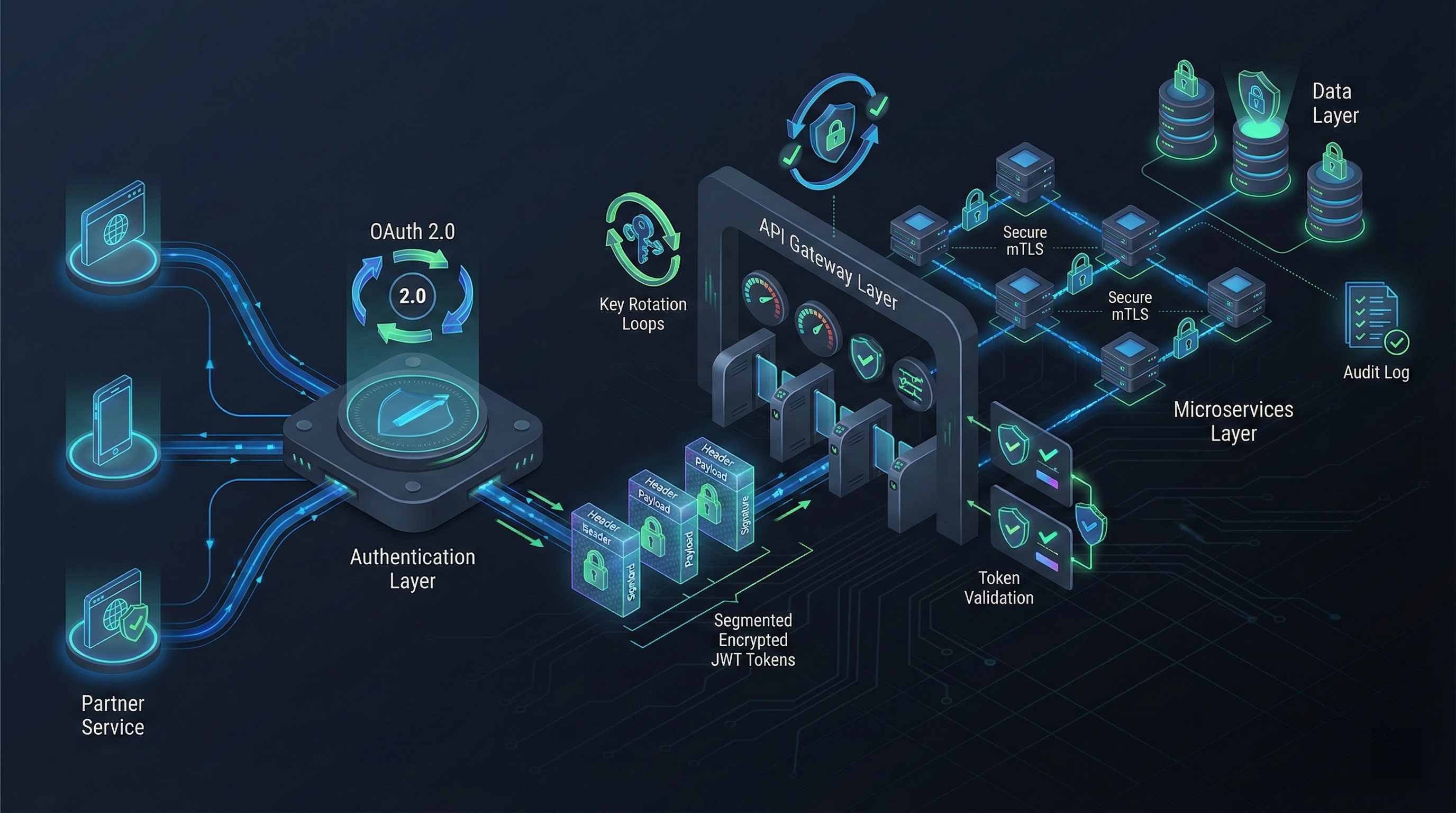
Building Production APIs with Authentication: OAuth 2.0, JWT, and API Key Management in 2026
A Comprehensive Technical Guide for Enterprise Implementation
Author: API Security Specialist | Last Updated: January 23, 2026 | Read Time: 18 minutes
The $500K Authentication Mistake: Why Your API Security Matters More Than Ever
Every month, enterprises deploy production APIs with authentication vulnerabilities that cost them an average of $500,000+ in remediation, compliance fines, and lost customer trust. The culprit? Not malicious hackers—but architects and engineers who inherited fragmented authentication patterns, chose the wrong method for their use case, or implemented outdated practices from 2020.
After building custom API telephony systems across enterprise deployments, I've observed a stark pattern: the companies that get authentication right deploy faster, scale cheaper, and sleep better. Those that don't face cascading security incidents, compliance audits, and the nightmare of retrofitting authentication into production systems serving thousands of clients.
This guide cuts through the noise. You'll learn exactly how to choose between OAuth 2.0, JWT, and API keys for your specific use case, implement production-grade token management, handle refresh strategies that don't break under load, and design an architecture that passes security audits without compromise.
Part 1: Why Authentication Architecture Decisions Matter in 2026
The Cost of Getting It Wrong
The threat landscape has evolved dramatically. In 2025, 84% of organizations reported experiencing at least one API-related security incident. But more insidious than breaches are the architectural decisions that create unnecessary attack surface: zuplo
- Slow feature deployment: Poorly designed authentication layers require 2-3x more time per feature release to ensure security compliance
- Compliance failures: Inadequate audit logging and token management lead to failed GDPR, HIPAA, and SOX assessments
- Token exhaustion at scale: A single misconfigured refresh token strategy can bring your entire microservices cluster to its knees during peak traffic
- Vendor lock-in costs: Changing authentication providers mid-deployment costs 6-12 months of engineering effort
Why 2026 is Different
Traditional security models relied on network perimeter defenses—firewalls, VPNs, and castle-and-moat architecture. That approach fails entirely with APIs because your endpoints live everywhere: SaaS partners, mobile clients, internal microservices, and third-party integrations. Each interaction must be authenticated independently. informatica
The modern approach, called zero-trust API architecture, requires every request—whether from inside your network or outside—to prove its identity, authorization, and context. This is not optional for enterprises anymore; it's the baseline.
Additionally, the authentication ecosystem has matured. PKCE (Proof Key for Code Exchange), mutual TLS (mTLS), and refresh token rotation are no longer nice-to-haves; they're industry standards. Implementing them correctly moves your team from "we have authentication" to "we have production-grade security."
Part 2: Choosing Your Authentication Method
Before implementing, you must answer one question: Who needs to access your API, and from where?
| Authentication Method | Best For | Implementation Complexity | Security Level | When to Use |
|---|---|---|---|---|
| OAuth 2.0 | Third-party integrations, delegated access, enterprise SSO | High | Very High | External partners, workforce authentication |
| JWT (JSON Web Tokens) | Microservices, stateless systems, distributed teams | Medium | High (if implemented correctly) | Internal APIs, SPA backends, mobile apps |
| API Keys | Server-to-server, internal services, public APIs with rate limiting | Low | Medium | Simple integrations, internal DevOps tools |
| mTLS (Mutual TLS) | High-security banking/healthcare, service-to-service in private networks | Very High | Very High | Financial APIs, regulated environments |
| Bearer Tokens | Modern web APIs, token-based access | Low-Medium | Medium-High | Scalable web services, REST APIs |
The decision tree:
- Is this a public-facing API with external partners? → OAuth 2.0
- Are you building microservices that talk to each other internally? → JWT
- Simple internal service authentication without user context? → API Keys
- Extreme security requirements (finance, healthcare)? → mTLS + OAuth 2.0 combined
- Mobile app or single-page application (SPA) backend? → OAuth 2.0 with PKCE + JWT
Part 3: OAuth 2.0—The Enterprise Standard
OAuth 2.0 has become the de facto standard for enterprise API authentication. Unlike older approaches that exposed credentials, OAuth uses a delegated access model: users grant applications permission to act on their behalf without ever sharing passwords.
The Authorization Code Flow with PKCE
PKCE (pronounced "pixie") is an extension to OAuth 2.0 designed specifically to protect against authorization code interception attacks. It's essential for public clients like mobile apps or SPAs where you can't securely store a client secret.
How it works in 4 steps:
Step 1: Client Creates a Code Verifier
code_verifier = generate_random_string(43-128 characters)
code_challenge = BASE64_URL_ENCODE(SHA256(code_verifier))
Step 2: User Redirects to Authorization Server
https://auth-server.com/authorize?
  client_id=YOUR_CLIENT_ID
  redirect_uri=https://yourapp.com/callback
  response_type=code
  scope=openid profile email
  code_challenge=GENERATED_CHALLENGE
  code_challenge_method=S256
  state=RANDOM_STRING_FOR_CSRF_PROTECTION
Step 3: User Authenticates and Grants Permission The authorization server redirects back with:
https://yourapp.com/callback?
  code=AUTHORIZATION_CODE
  state=SAME_RANDOM_STRING
Step 4: Backend Exchanges Code for Tokens
curl -X POST https://auth-server.com/token \
  -H "Content-Type: application/x-www-form-urlencoded" \
  -d "grant_type=authorization_code" \
  -d "client_id=YOUR_CLIENT_ID" \
  -d "code=AUTHORIZATION_CODE" \
  -d "code_verifier=ORIGINAL_CODE_VERIFIER" \
  -d "redirect_uri=https://yourapp.com/callback"
Response:
{
  "access_token": "eyJhbGciOiJIUzI1NiIsInR5cCI6IkpXVCJ9...",
  "refresh_token": "REFRESH_TOKEN_VALUE",
  "expires_in": 1800,
  "token_type": "Bearer"
}
Why PKCE is Non-Negotiable for 2026
Without PKCE, attackers could intercept the authorization code during the redirect and exchange it for tokens before your legitimate app does. PKCE eliminates this attack vector by requiring proof that the same client that requested the authorization code is the one exchanging it.
Implementation benchmark: Adding PKCE requires adding 3-4 additional code lines on the client and 2-3 on the backend. The security improvement is exponential.
Part 4: JWT Tokens—Stateless Authentication at Scale
JSON Web Tokens (JWT) are self-contained, cryptographically signed tokens that carry claims (user ID, permissions, roles, metadata) directly within the token. They're ideal for microservices because they eliminate the need for repeated database lookups.
JWT Structure Explained
A JWT consists of three Base64-encoded parts separated by dots:
eyJhbGciOiJIUzI1NiIsInR5cCI6IkpXVCJ9.
eyJzdWIiOiIxMjM0NTY3ODkwIiwibmFtZSI6IkpvaG4gRG9lIiwiaWF0IjoxNTE2MjM5MDIyfQ.
SflKxwRJSMeKKF2QT4fwpMeJf36POk6yJV_adQssw5c
Header (what algorithm is used):
{
  "alg": "HS256",
  "typ": "JWT"
}
Payload (the claims):
{
  "sub": "user123",
  "name": "John Doe",
  "email": "[email protected]",
  "roles": ["admin", "developer"],
  "iat": 1516239022,
  "exp": 1516242622,
  "aud": "api.company.com",
  "iss": "auth.company.com"
}
Signature (proves token hasn't been tampered with):
HMACSHA256(
  base64UrlEncode(header) + "." +
  base64UrlEncode(payload),
  SECRET_KEY
)
Critical: JWT Expiration Strategy
This is where most teams fail. The default mistake: issuing JWTs that live for days or weeks.
The correct approach:
- Access tokens: 5-15 minutes maximum curity
- Refresh tokens: 7-30 days (depending on sensitivity)
- Never issue non-expiring tokens — this is equivalent to leaving your house key under the mat forever
Here's the production-grade pattern:
// Generate short-lived access token
const accessToken = jwt.sign({
  sub: userId,
  roles: userRoles,
  aud: 'api.company.com',
  iss: 'auth.company.com'
}, SECRET_KEY, {
  algorithm: 'HS256',
  expiresIn: '15m' // 15 minutes
});

// Generate longer-lived refresh token
const refreshToken = jwt.sign({
  sub: userId,
  jti: generateUniqueTokenId() // Unique ID for revocation
}, REFRESH_SECRET_KEY, {
  algorithm: 'HS256',
  expiresIn: '7d' // 7 days
});
Why Token Rotation Prevents Catastrophic Breaches
If an attacker steals a JWT that expires in 15 minutes, they have a 15-minute attack window. If they steal one that expires in 7 days, you've handed them a week-long backdoor.
But refresh tokens require even more care. Here's the critical detail most documentation misses:
When a client uses a refresh token to get new tokens:
- Issue a new access token
- Issue a new refresh token
- Invalidate the old refresh token immediately
This "refresh token rotation" pattern ensures that even if an attacker obtains a refresh token, they can only use it once. After that single use, they get one new set of tokens, and the old token is dead.
// Refresh token endpoint
app.post('/refresh', (req, res) => {
  const oldRefreshToken = req.body.refresh_token;

  // Verify the refresh token
  try {
    const decoded = jwt.verify(oldRefreshToken, REFRESH_SECRET_KEY);

    // Check if token has been revoked (stored in Redis)
    if (redis.get(`revoked:${decoded.jti}`)) {
      return res.status(401).json({ error: 'Token revoked' });
    }

    // Generate new tokens
    const newAccessToken = jwt.sign({...}, SECRET_KEY, {expiresIn: '15m'});
    const newRefreshToken = jwt.sign({...}, REFRESH_SECRET_KEY, {expiresIn: '7d'});

    // Revoke the old refresh token
    redis.set(`revoked:${decoded.jti}`, true, 'EX', 604800); // 7 days

    res.json({
      access_token: newAccessToken,
      refresh_token: newRefreshToken
    });
  } catch (err) {
    res.status(401).json({ error: 'Invalid token' });
  }
});
The Seven JWT Security Practices Enterprises Require
| Practice | Why It Matters | Implementation |
|---|---|---|
| Always validate signatures | Prevents token tampering | Use jwt.verify() with secret key on every request |
| Check issuer (iss) claim | Prevents token spoofing from rogue issuers | Whitelist expected issuer URLs |
| Validate audience (aud) claim | Ensures token intended for your API | Verify aud matches your API identifier |
| Use asymmetric signing | EdDSA or ES256 for distributed systems | Use public/private key pairs, not shared secrets |
| Never store sensitive data | JWT payload is Base64, not encrypted | No credit cards, SSNs, passwords in token body |
| Implement short expiration | Limits damage if token is stolen | 5-15 minutes for access tokens maximum |
| Download keys from JWKS endpoint | Enables key rotation without breaking clients | Cache from https://auth-server/.well-known/jwks.json |
Part 5: API Key Management in Production
API keys are the simplest form of authentication but paradoxically require the most discipline to manage securely.
Why API Keys Get Compromised
API keys are long-lived credentials with no built-in expiration. They're often hardcoded in source code, exposed in GitHub repositories, embedded in frontend code, or baked into Docker images.
Real incident from 2025: A Fortune 500 company exposed an API key in a public GitHub repository. Within 30 minutes, attackers had accessed customer data. Remediation cost: $2.3M + regulatory fines.
The solution is automated rotation + version management.
Production-Grade API Key Rotation Strategy
High-risk APIs (financial, healthcare): Rotate every 30 days
Moderate-risk APIs: Rotate every 90 days
Low-risk APIs: Rotate every 180 days
The pattern: Use a grace period where both old and new keys remain valid, allowing downstream systems time to update.
Day 1: Issue NEW_KEY_2
Day 2-3: Both OLD_KEY and NEW_KEY_2 remain active (grace period)
Day 4: Revoke OLD_KEY
Day 5: Audit to ensure all services updated
Implementation with a secrets manager (HashiCorp Vault or AWS Secrets Manager):
# Python with AWS Secrets Manager
import boto3
import json
from datetime import datetime, timedelta

client = boto3.client('secretsmanager', region_name='us-east-1')

def rotate_api_key(secret_name, new_key_value):
    """Rotate API key with version tracking"""

    # Get current secret metadata
    response = client.describe_secret(SecretId=secret_name)

    # Store new version with metadata
    client.put_secret_value(
        SecretId=secret_name,
        ClientRequestToken=f"rotation-{datetime.now().isoformat()}",
        SecretString=json.dumps({
            'active': new_key_value,
            'previous': response['SecretString'],
            'rotated_at': datetime.now().isoformat(),
            'grace_period_expires': (datetime.now() + timedelta(days=2)).isoformat()
        })
    )

    # Trigger Lambda to update applications
    invoke_key_update_lambda(new_key_value)
The Critical: Never Hardcode Keys
Instead, use environment variables:
// ⌠WRONG
const API_KEY = 'sk-abc123def456';

// ✅ CORRECT
const API_KEY = process.env.API_KEY;

// Load from secrets manager at startup
async function loadSecrets() {
  const secret = await secretsManager.getSecret('api/production/key');
  process.env.API_KEY = secret.value;
}
Part 6: Building Your Layered Security Architecture
Enterprise APIs require defense in depth. A single security layer isn't enough; even if one layer is compromised, additional controls prevent full exploitation.
The Four-Layer Model
Layer 1: Gateway (Interaction Layer)
- Validates OAuth tokens
- Enforces rate limiting (prevents brute-force attacks)
- Validates request format
- Implements IP whitelisting for internal APIs
Example: All external API calls must present valid Bearer token with correct aud claim. If missing or expired, reject immediately.
Layer 2: Application Logic (Application Layer)
- Enforces role-based access control (RBAC)
- Implements business rules ("user can only see their own data")
- Validates JWT claims and scopes
Example: Even if an attacker bypasses the gateway with a valid token, the application layer ensures they can only access resources they're authorized for.
Layer 3: Service-to-Service (Integration Layer)
- Uses mTLS or OAuth client credentials flow
- Ensures only trusted services call each other
- Prevents rogue services from impersonating legitimate ones
Layer 4: Data (Data Layer)
- Row-level security with encryption at rest
- Database-level access controls
- Final safeguard if upper layers are compromised
┌─────────────────────────────────────────────────────────â”
│ User/Client Request                                      │
└─────────────────────────────┬───────────────────────────┘
                              │
                              â–¼
          ┌──────────────────────────────────â”
          │  LAYER 1: API Gateway            │
          │  • Validate Bearer Token         │
          │  • Check expiration (exp)        │
          │  • Rate limiting                 │
          └──────────────┬───────────────────┘
                         │
                         â–¼
          ┌──────────────────────────────────â”
          │  LAYER 2: Application Logic      │
          │  • Validate JWT claims           │
          │  • Check roles (RBAC)            │
          │  • Business authorization rules  │
          └──────────────┬───────────────────┘
                         │
                         â–¼
          ┌──────────────────────────────────â”
          │  LAYER 3: Microservice Auth      │
          │  • mTLS certificates             │
          │  • Service-to-service OAuth      │
          │  • Prevent impersonation         │
          └──────────────┬───────────────────┘
                         │
                         â–¼
          ┌──────────────────────────────────â”
          │  LAYER 4: Data Protection        │
          │  • Row-level security            │
          │  • Encryption at rest            │
          │  • Database-level access control │
          └──────────────────────────────────┘
Zero-Trust in Practice
Zero-trust eliminates the concept of implicit trust. Every request—internal or external—must authenticate.
// Express.js middleware demonstrating zero-trust
const zeroTrustMiddleware = async (req, res, next) => {
  const token = req.headers.authorization?.split(' ') [zuplo](https://zuplo.com/learning-center/top-7-api-authentication-methods-compared);

  if (!token) {
    return res.status(401).json({ error: 'No token provided' });
  }

  try {
    // 1. Verify signature
    const decoded = jwt.verify(token, PUBLIC_KEY);

    // 2. Check expiration
    if (Date.now() >= decoded.exp * 1000) {
      return res.status(401).json({ error: 'Token expired' });
    }

    // 3. Verify issuer (is this from the right auth server?)
    if (decoded.iss !== EXPECTED_ISSUER) {
      return res.status(401).json({ error: 'Invalid issuer' });
    }

    // 4. Verify audience (is this token for us?)
    if (!decoded.aud.includes(API_IDENTIFIER)) {
      return res.status(401).json({ error: 'Token not intended for this API' });
    }

    // 5. Check for device fingerprint (step-up verification)
    const deviceId = generateDeviceFingerprint(req);
    if (deviceId !== decoded.device_id) {
      // Device changed - require re-authentication
      return res.status(403).json({ error: 'Device mismatch - please re-authenticate' });
    }

    // 6. Verify in revocation list (cached in Redis)
    if (await isTokenRevoked(decoded.jti)) {
      return res.status(401).json({ error: 'Token has been revoked' });
    }

    req.user = decoded;
    next();
  } catch (err) {
    res.status(401).json({ error: 'Invalid token' });
  }
};
Part 7: Compliance and Enterprise Governance
Security isn't just technical—it's a compliance requirement.
Authentication Requirements by Industry
| Regulation | Requirement | Implementation |
|---|---|---|
| GDPR | Audit trail of all data access, consent management | Log every API access with user, timestamp, resource accessed |
| HIPAA | Role-based access control for PHI (Protected Health Information) | Embed roles in JWT, validate in gateway, audit in database |
| PCI DSS | Tokenization of payment data, TLS encryption | Never store raw card data; use token-based APIs |
| SOX | Integrity monitoring of financial data | Real-time anomaly detection on API access patterns |
Building Audit-Ready Logging
{
  "timestamp": "2026-01-23T15:32:45Z",
  "user_id": "user123",
  "api_endpoint": "GET /api/v1/customers/cust456",
  "http_method": "GET",
  "status_code": 200,
  "response_time_ms": 142,
  "token_sub": "user123",
  "token_roles": ["admin"],
  "ip_address": "203.0.113.42",
  "user_agent": "Mozilla/5.0...",
  "resource_accessed": "customer_456",
  "action": "read",
  "data_classification": "PII",
  "compliance_required": true
}
This log structure enables:
- GDPR audits: Who accessed what PII and when?
- SOX compliance: Trace all changes to financial data
- Anomaly detection: Unusual access patterns (e.g., user accessing 10,000 records at 3 AM)
Part 8: Implementation Patterns for Different Use Cases
Pattern 1: Enterprise SPA with External Partners (OAuth 2.0 + JWT)
Scenario: Your frontend app needs to access APIs. Partner fintech apps need read-only access to transactions.
┌──────────────┠┌──────────────┠┌──────────────â”
│ Frontend │ │ Auth │ │ Resource │
│ (SPA) │ │ Server │ │ Server │
│ │ │ (OAuth) │ │ (API) │
└──────────────┘ └──────────────┘ └──────────────┘
│ │ │
│─ 1. Request Login ──▶│ │
│ │ │
│◀─ 2. Redirect to ────│ │
│ Auth URL │ │
│ │ │
│─ 3. Authenticate ──▶│ │
│ & Consent │ │
│ │ │
│◀─ 4. Redirect with ─│ │
│ Auth Code │ │
│ │ │
│─ 5. Backend ───────▶│ (PKCE + Code) │
│ exchanges code │ │
│ │ │
│◀─ 6. Access Token ──│ │
│ & Refresh │ │
│ │ │
│─ 7. API Call ──────────────────────────────▶│
│ with JWT │ │
│ │ │
│◀─ 8. Protected ─────────────────────────────│
│ Resource │ │
Implementation checklist:
- Frontend stores tokens in memory (never localStorage for security)
- Backend performs PKCE code exchange server-to-server
- API validates JWT signature using public key from JWKS endpoint
- Implement refresh token rotation on backend
- Log all token grants/refreshes for compliance
Pattern 2: Microservices Internal Authentication (mTLS + OAuth Client Credentials)
Scenario: Microservice A needs to call Microservice B securely within your private network.
# Service A authenticates to Service B using mutual TLS
curl --cert /etc/secrets/service-a-cert.pem \
     --key /etc/secrets/service-a-key.pem \
     --cacert /etc/secrets/ca-cert.pem \
     https://service-b:5000/api/internal/data
Additional layer: OAuth client credentials for additional authorization:
# Service A requests access token
curl -X POST https://auth-server:5000/token \
  --cert /etc/secrets/service-a-cert.pem \
  -d "grant_type=client_credentials" \
  -d "client_id=service-a" \
  -d "scope=service-b:read"
Result: Service B verifies:
- mTLS certificate of caller ✓
- Bearer token with correct
audandscope✓
Pattern 3: Third-Party API Key Integration (API Keys + Rate Limiting)
Scenario: You offer a public API to paying customers; you need to track usage per customer.
# Generate API key for customer
def create_customer_api_key(customer_id):
    api_key = secrets.token_urlsafe(32)  # Cryptographically secure random

    # Store hashed key + metadata
    db.save({
        'customer_id': customer_id,
        'key_hash': bcrypt.hash(api_key),
        'name': 'Production API Key',
        'created_at': datetime.now(),
        'expires_at': datetime.now() + timedelta(days=90),
        'rate_limit': 10000,  # requests per day
        'active': True
    })

    return api_key
Gateway validation:
@app.before_request
def validate_api_key():
    api_key = request.headers.get('X-API-Key')

    if not api_key:
        abort(401, 'API key required')

    # Hash the key before looking up
    key_hash = bcrypt.hash(api_key)
    customer = db.find_by_key_hash(key_hash)

    if not customer or not customer['active']:
        abort(401, 'Invalid API key')

    if customer['expires_at'] < datetime.now():
        abort(401, 'API key expired')

    # Check rate limit
    current_requests = redis.incr(f"api_key:{api_key}:requests_today")
    if current_requests > customer['rate_limit']:
        abort(429, 'Rate limit exceeded')

    request.customer_id = customer['id']
Part 9: Common Mistakes and How to Avoid Them
| Mistake | Why It's Dangerous | Solution |
|---|---|---|
| Non-expiring tokens | If stolen, grants indefinite access | Always set token expiration (5-15 min for access tokens) |
| Storing secrets in code | Version control history is permanent | Use environment variables + secrets manager |
| No token signature validation | Attacker can forge tokens | Always call jwt.verify() with secret key |
| Storing sensitive data in JWT payload | Base64 is not encryption | Avoid PII, credit cards, passwords in token body |
| Not rotating refresh tokens | Compromised token becomes permanent backdoor | Issue new refresh token on every refresh, invalidate old one |
| Single auth layer | One vulnerability = total compromise | Implement defense-in-depth across 4 layers |
| Weak key rotation practices | Keys compromised months ago still active | Automate rotation every 30-90 days with grace period |
| Not monitoring anomalies | Breaches go undetected for weeks | Implement real-time alerts for unusual patterns |
Part 10: Production Deployment Checklist
Before deploying your authentication system to production, verify:
Authentication Layer
- All tokens have expiration times
- Refresh token rotation is implemented
- JWT signatures validated on every request
- PKCE enabled for all public clients
- API keys rotated every 30-90 days
Security & Compliance
- Secrets stored in encrypted vault (Vault, AWS Secrets Manager)
- mTLS certificates for internal service communication
- Audit logs capture all access events with user/timestamp/resource
- Compliance requirements (GDPR, HIPAA, PCI DSS) mapped to controls
- Rate limiting enabled at gateway level
Operations & Monitoring
- Real-time alerting for expired certificates
- Automated token key rotation without downtime
- Monitoring for anomalous API usage patterns
- Incident response plan for token compromise
- Regular penetration testing of auth endpoints
Development & Testing
- Unit tests for token generation/validation
- Integration tests for OAuth flow (all grant types)
- Load testing for token endpoint (can it handle peak traffic?)
- Security tests for common attacks (token tampering, replay attacks)
- Documentation for authentication implementation
Conclusion: The Path Forward
Choosing and implementing the right authentication system is one of the highest-ROI decisions you'll make as an engineer or architect. A solid authentication foundation:
✓ Enables faster feature shipping — security is built-in, not retrofitted
✓ Passes compliance audits — automatically generates audit trails
✓ Reduces security incidents — defense-in-depth catches exploits early
✓ Simplifies troubleshooting — standardized tokens are easier to debug
✓ Scales with your business — JWT and OAuth handle thousands of requests/second
The implementation path is straightforward:
- Start with zero-trust principles — treat every request as untrusted
- Choose your authentication method based on use case (OAuth for external, JWT for internal)
- Implement defense-in-depth across all four layers
- Automate key rotation with secrets management tools
- Monitor continuously with real-time anomaly detection
Ready to Secure Your APIs Professionally?
Building production-grade API authentication is complex. If you're engineering enterprise APIs, managing multiple microservices, or facing compliance audits, professional guidance saves months of work and prevents costly mistakes.
Get expert consulting on:
- API security architecture design for your specific use case
- OAuth 2.0 and JWT implementation tailored to your stack
- Compliance automation (GDPR, HIPAA, SOX, PCI DSS)
- Microservices authentication patterns
- API gateway and secrets management setup
Schedule a consultation — Let's discuss your API authentication requirements and build a security-first architecture for your business.
Frequently Asked Questions
Q: Should I use JWT or OAuth 2.0? A: They're complementary. Use OAuth 2.0 for the initial authentication/authorization flow (especially for external parties), then use JWT as the actual token format for API requests. OAuth 2.0 is the flow; JWT is the token type.
Q: How often should I rotate API keys? A: Minimum every 90 days for general APIs; every 30 days for high-risk systems (financial, healthcare). Use automated secrets managers to make rotation seamless.
Q: Is it safe to store JWTs in localStorage? A: No. localStorage is vulnerable to XSS attacks. Better approaches: (1) Store in memory + use refresh token rotation, or (2) Use HTTP-only cookies (but this has trade-offs for SPAs).
Q: What's the difference between "expires_in" and the "exp" claim? A: expires_in (seconds from now) is returned when you first receive a token. The exp claim (Unix timestamp) is embedded in the JWT itself and is what the API validates.
Q: Do I need mTLS if I'm already using OAuth? A: For internal microservices, yes. OAuth authenticates the user/client making the request. mTLS authenticates the transport layer (ensures the actual connection is secure). Together they provide defense-in-depth.